Selenium Automation with Java
Harry
· 21 Sep 2026
· 1 views
Log in to track your progress and mark lessons complete.
Sponsored
 Try Our Online Compiler
Run Code Now →
Try Our Online Compiler
Run Code Now →
Introduction to Selenium
Selenium WebDriver drives real browsers through code. With Java it is the industry standard stack for UI regression suites.
Setup (Maven)
<dependency>
  <groupId>org.seleniumhq.selenium</groupId>
  <artifactId>selenium-java</artifactId>
  <version>4.21.0</version>
</dependency>
First Test
WebDriver driver = new ChromeDriver();
driver.get("https://groovygrails.in/login");
driver.findElement(By.id("email")).sendKeys("user@test.com");
driver.findElement(By.id("password")).sendKeys("Pass@123");
driver.findElement(By.cssSelector("button[type=submit]")).click();
// assert dashboard visible, then driver.quit();
Locators: XPath and CSS
- Prefer stable IDs and names first.
- CSS: #loginBtn, input[name=email], .cart > li.
- XPath: //button[text()=Login], //input[@type=password]. Powerful but brittle; avoid absolute paths.
Forms, Dropdowns, Alerts, Frames, Windows
- Dropdowns: new Select(element).selectByVisibleText(...).
- Alerts: driver.switchTo().alert().accept().
- Frames: switchTo().frame(name), back with defaultContent().
- Tabs: switchTo().window(handle) from getWindowHandles().
- Actions class for hover, drag-drop and keyboard chords.
Waits and Screenshots
- Never use Thread.sleep: use WebDriverWait with ExpectedConditions (visible, clickable).
- Capture screenshots on failure for the bug report.
Page Object Model and Data-Driven Tests
One class per page (LoginPage with loginAs() method); tests call page methods, never raw locators. Feed data from CSV/Excel so one test covers 50 credential rows.
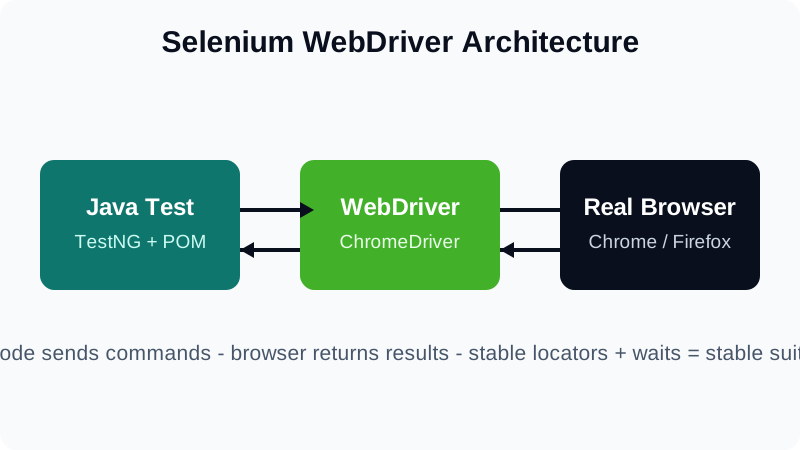
- Stable locators plus explicit waits equal stable suites.
- Page Objects keep UI changes in one place.
- Automate regression, not exploration.