Apache POI: Reading and Writing Excel Files
Harry
· 11 Sep 2026
· 9 views
What is Apache POI?
Apache POI is the Java library for Microsoft Office formats. The most used component is XSSF, which handles Word/Excel 2007+ files (xlsx). The older HSSF handles .xls files.
Project Setup
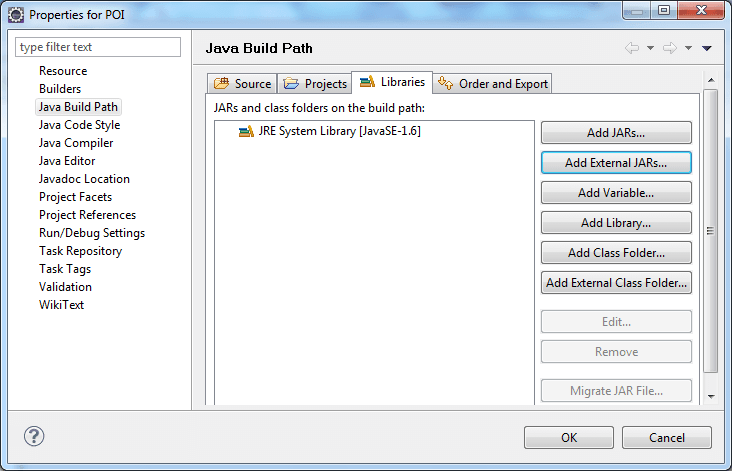
Download the POI JARs (poi, poi-ooxml and their dependencies) and add them to the build path. With Maven, add org.apache.poi:poi-ooxml.

Writing an Excel File
import org.apache.poi.ss.usermodel.*;
import org.apache.poi.xssf.usermodel.XSSFWorkbook;
import java.io.FileOutputStream;

public class WriteExcel {
    public static void main(String[] args) throws Exception {
        try (Workbook wb = new XSSFWorkbook()) {
            Sheet sheet = wb.createSheet("Students");
            Row header = sheet.createRow(0);
            header.createCell(0).setCellValue("Name");
            header.createCell(1).setCellValue("Grade");
            Row r1 = sheet.createRow(1);
            r1.createCell(0).setCellValue("Nisha");
            r1.createCell(1).setCellValue(10);
            try (FileOutputStream out = new FileOutputStream("students.xlsx")) {
                wb.write(out);
            }
        }
        System.out.println("Excel file created.");
    }
}
Reading an Excel File
import org.apache.poi.ss.usermodel.*;
import org.apache.poi.xssf.usermodel.XSSFWorkbook;
import java.io.FileInputStream;

public class ReadExcel {
    public static void main(String[] args) throws Exception {
        try (Workbook wb = new XSSFWorkbook(new FileInputStream("students.xlsx"))) {
            Sheet sheet = wb.getSheetAt(0);
            for (Row row : sheet) {
                for (Cell cell : row) {
                    System.out.print(cell.toString() + "\t");
                }
                System.out.println();
            }
        }
    }
}
Key Points
XSSFWorkbookhandles .xlsx;HSSFWorkbookhandles .xls.- Use try-with-resources so the workbook is closed after writing.
- Iterate with
sheet/row/cellobjects - no XML plumbing needed.