The Build Lifecycle and Common Commands
Harry
· 14 Sep 2026
· 2 views
Advertisement

Maven's lifecycle
Maven runs through an ordered sequence of phases. Running any phase runs every phase before it, so you only ever name the furthest point you want to reach:
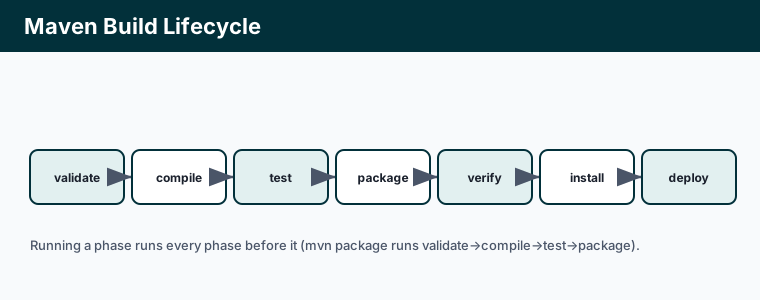
validate– check the project is correct.compile– compile the source.test– run unit tests.package– build the JAR/WAR.install– copy it into your local repository for other local projects.deploy– publish it to a remote repository.
Everyday Maven commands
mvn clean            # delete the target/ folder
mvn compile          # compile only
mvn test             # compile and run tests
mvn package          # produce the JAR/WAR in target/
mvn clean install    # full build, install to ~/.m2
mvn -DskipTests package   # package without running tests
clean is not a lifecycle phase but a separate one you usually prepend to guarantee a fresh build: mvn clean package.
Gradle's tasks
Gradle is organised around tasks with dependencies between them, rather than fixed phases:
gradle build         # compile, test and assemble
gradle test          # run tests
gradle clean         # delete build/
gradle bootRun       # (Spring Boot) run the app
gradle tasks         # list available tasks
The wrapper
Commit the wrapper (mvnw / gradlew) with your project. It pins the exact build-tool version and downloads it on demand, so every developer and CI machine builds identically without installing the tool globally:
./mvnw clean package
./gradlew build
Key points
- Maven phases run in order; naming a phase runs all earlier ones.
mvn clean packageandmvn clean installare the everyday commands.- Gradle uses tasks;
gradle buildcompiles, tests and assembles. - Use the committed wrapper (
mvnw/gradlew) for reproducible builds everywhere.