Linux, the Shell and the Filesystem

Linux and the shell
Linux is an open-source operating system that runs most of the world's servers, cloud infrastructure and Android phones. You often work with it through a text interface called the shell; the most common shell is Bash. Typing commands in the shell is faster, scriptable and more precise than clicking – essential for servers, which usually have no graphical desktop.
One filesystem tree
Unlike Windows with its C: and D: drives, Linux has a single tree that starts at the root, written /. Everything – files, folders, even devices – lives somewhere under it.
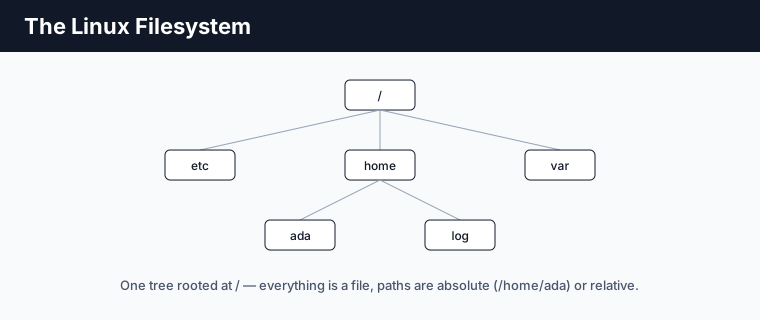
/home– users' personal folders (/home/ada)./etc– system configuration files./var– variable data such as logs (/var/log)./usr– installed programs and libraries.
Absolute and relative paths
An absolute path starts from root (/home/ada/notes.txt). A relative path is from where you currently are. Two shortcuts appear everywhere: . is the current directory and .. is the parent; ~ is your home folder.
Everything is a file
A defining Unix idea: not just documents but devices, and even running processes, are represented as files. This uniformity is why the same small tools work on almost anything.
Key points
- Linux runs most servers; you drive it through a shell, usually Bash.
- The filesystem is one tree rooted at
/– no drive letters. - Paths are absolute (from
/) or relative;.,..and~are key shortcuts. - “Everything is a file” gives Unix its uniform, composable design.