What Docker Is and the Problem It Solves

The “works on my machine” problem
Software behaves differently across laptops, CI servers and production because each machine has its own operating-system libraries, language runtimes and configuration. Docker fixes this by packaging an application together with everything it needs to run – code, runtime, system tools and libraries – into a single, portable unit called a container. A container that runs on your machine runs identically everywhere else.
Containers versus virtual machines
A virtual machine virtualises hardware: each VM ships a full guest operating system, so it is heavy (gigabytes) and slow to boot. A container virtualises the operating system instead – all containers on a host share the same Linux kernel but stay isolated from each other. The result is that containers are small (megabytes), start in milliseconds, and you can run dozens on a laptop.
- VM: App + libraries + a full guest OS, on a hypervisor.
- Container: App + libraries only, sharing the host kernel.
Images and containers
These two words cause most of the early confusion, so pin them down now:
- An image is a read-only template – a snapshot of a filesystem plus metadata about how to start the app. Think of it as a class.
- A container is a running instance of an image. Think of it as an object created from that class. You can start many containers from one image.
How the pieces fit
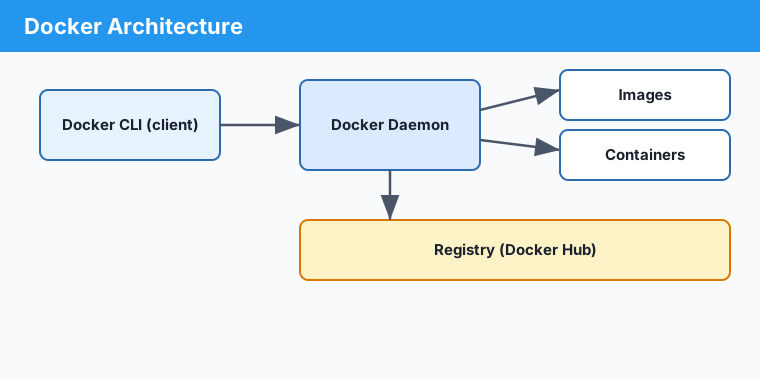
You type commands into the Docker CLI. The CLI talks to the Docker daemon, a background service that actually builds images, runs containers and pulls images from a registry such as Docker Hub.
Key points
- Containers package an app with its dependencies for identical behaviour everywhere.
- They share the host kernel, so they are far lighter than virtual machines.
- An image is a template; a container is a running instance of it.
- The CLI drives the daemon, which pulls images from a registry.