Version Control and Why Git Won

What version control solves
Without version control you end up with folders named project-final, project-final-2, project-really-final. A version control system records the full history of your project so you can see what changed, when and by whom, roll back to any point, and let many people work on the same code without overwriting each other.
Snapshots, not differences
Older tools stored a list of file-by-file changes. Git instead stores a series of snapshots of your whole project. Each time you commit, Git records what all your files look like at that moment and saves a reference to that snapshot. Unchanged files are not stored again – Git just links to the previous identical file – so this is fast and space-efficient.
The three areas
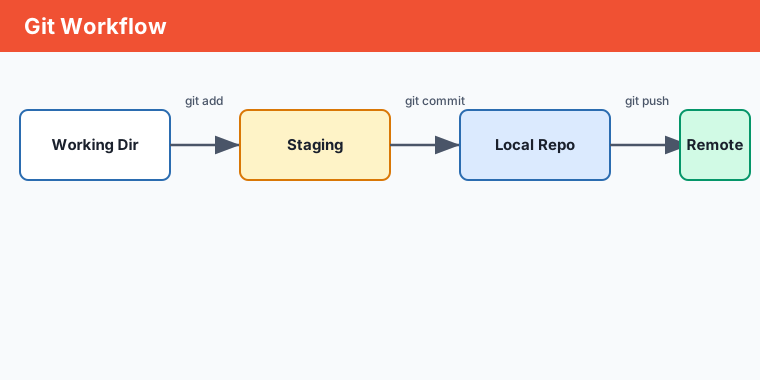
Almost every Git command moves files between three places. Understanding them makes Git click:
- Working directory – the actual files you edit.
- Staging area (index) – a holding zone where you assemble the next commit.
- Repository – the committed history, stored in the hidden
.gitfolder.
Local first, distributed by design
Git is distributed: every clone is a full copy of the entire history, not just the latest files. You can commit, branch and view history completely offline; syncing with others (via a remote like GitHub) is a separate, deliberate step.
Key points
- Version control records history so you can review, roll back and collaborate safely.
- Git stores full snapshots of the project, not per-file diffs.
- Commands move files between the working directory, the staging area and the repository.
- Git is distributed – each clone holds the complete history and works offline.