Select data from multiple table rows using JOIN
MySQL JOIN
- Normally we are retrieve information from one table at a time.
- This is correct for simple application, but in real time application MySQL uses queries to get data from multiple tables in a single query.
- MySQL uses the joining to smashing two or more table into a single table.
- There are different MySQL joins are: INNER JOIN
OUTER JOIN
CROSS JOIN
INNER JOIN
- The Inner Join retrieves all rows from both tables that are matched between the column in both table.
Syntax- SELECT < column1,column2,...columnN>
FROM < table1>
INNER JOIN < table2>
ON < table1.column=table2.column>;
Example-
mysql>SELECT employee.name,user.email FROM user INNER JOIN employee ON user.user_id=employee.emp_id;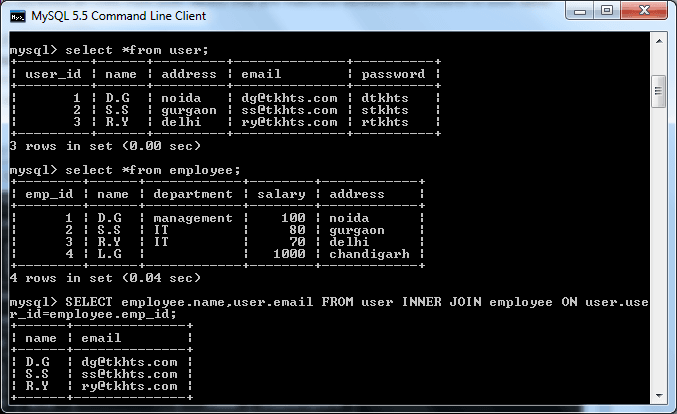
OUTER JOIN
- OUTER JOIN is used for finding records that may not have a match in the other table.
- OUTER JOIN is categorized into LEFT OUTER JOIN, RIGHT OUTER JOIN and FULL OUTER JOIN.
- LEFT OUTER JOIN, RIGHT OUTER JOIN also known as LEFT JOIN,RIGHT JOIN
- OUTER JOIN is used for finding records that may not have a match in the other table.
- OUTER JOIN is categorized into LEFT OUTER JOIN, RIGHT OUTER JOIN and FULL OUTER JOIN.
- LEFT OUTER JOIN, RIGHT OUTER JOIN also known as LEFT JOIN,RIGHT JOIN
LEFT JOIN
- The Left join retrieve all data of left table(table1), with the matching rows from right table(table2).
- If there is no match in right table then return null.
Syntax- SELECT < column1, column2,...columN>
FROM < table1>
LEFT JOIN < table2>
ON < table1.column=table2.column>;
Example-
mysql>SELECT employee.name,user.email FROM user LEFT JOIN employee ON user.user_id=employee.emp_id;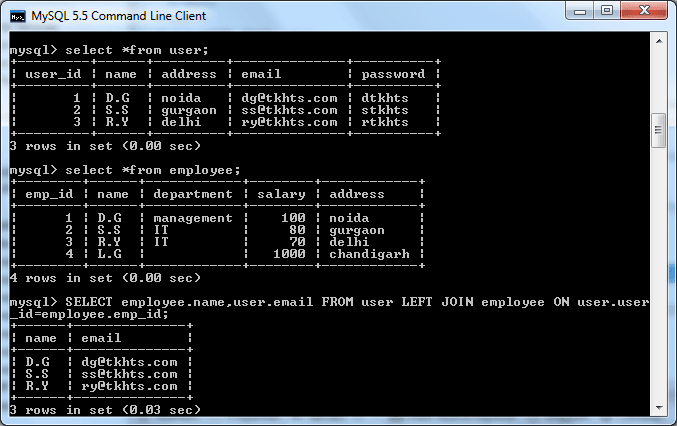
RIGHT JOIN
- The Right join retrieve all data from right table(table2), with the matching rows from left table(table1).
- If there is no match in left table then return null.
Syntax- SELECT < column1, column2,...columN>
FROM < table1>
RIGHT JOIN < table2>
ON < table1.column=table2.column>;
Example-
mysql>SELECT employee.name,user.email FROM user RIGHT JOIN employee ON user.user_id=employee.emp_id;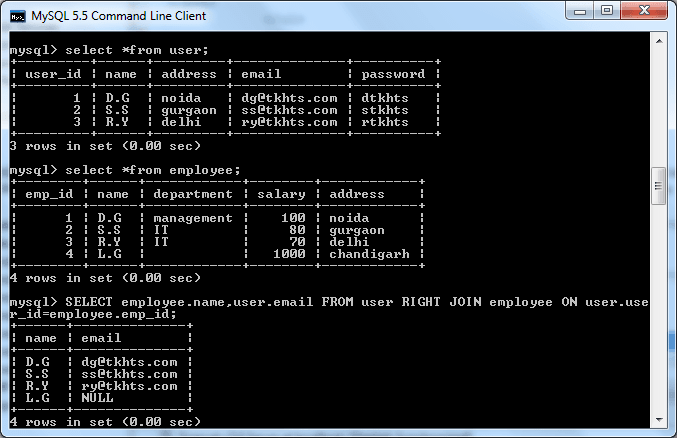
FULL OUTER JOIN
- The FULL OUTER JOIN retrieve all rows from the left table (table1) and from the right table (table2).
- If there is no match in left table then return null.
- MySQL doesn't support FULL OUTER JOIN
Syntax- SELECT < column1, column2,...columN>
FROM < table1>
FULL OUTER JOIN < table2>
ON < table1.column=table2.column>;
Example-
mysql>SELECT employee.name,user.email FROM user FULL OUTER JOIN employee ON user.user_id=employee.emp_id;
CROSS JOIN
- CROSS JOIN returns all the records where each row from the table1 is matched with each row from the table2. Syntax-
SELECT < column1,colmun2,... columnN >
FROM < table1>,< table2 >
(OR)
SELECT < column1,colmun2,... columnN >
FROM < table1>
CROSS JOIN < table1>
Example-
mysql>SELECT employee.name,user.email FROM user CROSS JOIN  user  ON user.user_id=employee.emp_id;
mysql>SELECT employee.name,user.email FROM user,employee;
Both queries retrieve same data from both tables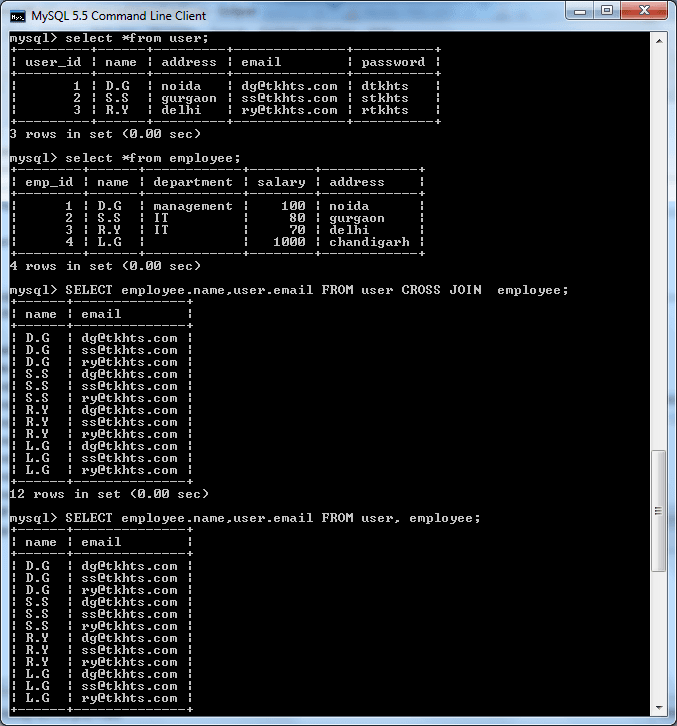
Perform nested sub-queries
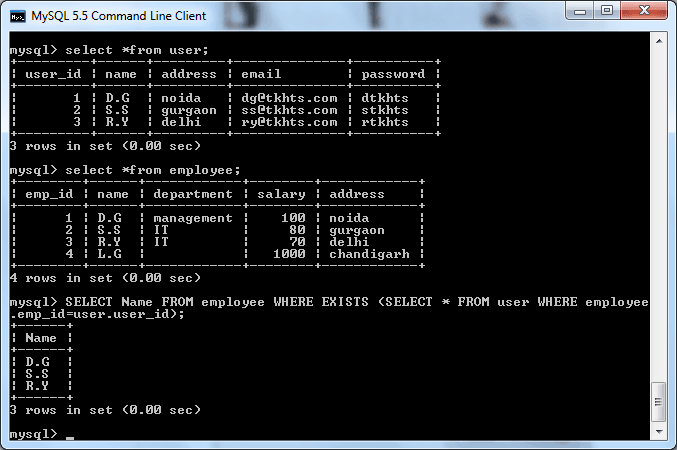
- Sub-Query is a query that has query inside the query.It is also known as inner query.
- Subqueries can be used with SELECT, INSERT, UPDATE, or DELETE statements.
- There are many way to execute query task.
Example-
mysql> SELECT Name FROM employee WHERE EXISTS (SELECT * FROM user WHERE employee.emp_id=user.user_id);