

Symfony Application Flow
- Incoming requests are interpreted by the routing and passed to controller functions that return Response objects.
- Each page of your site is defined in a routing configuration file that maps different URLs to different PHP functions.
- The job of each PHP function, called a controller, is to use information from the request - along with many other tools Symfony makes available - to create and return a Response object.
- In other words, the controller is where your code goes: it's where you interpret the request and create a response.
- Each request executes a front controller file.
- The routing system determines which PHP function should be executed based on information from the request and routing configuration you've created.
- The correct PHP function is executed, where your code creates and returns the appropriate Response object.
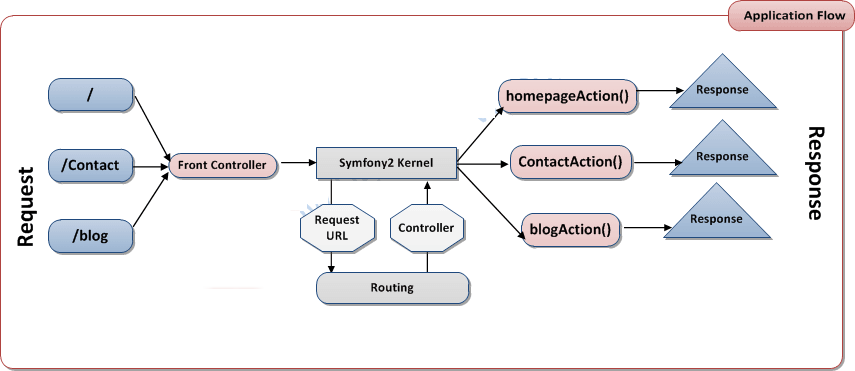
Symfony Request in Action
- You want to add a /contact page to your Symfony application. First, start by adding an entry for /contact to your routing configuration file :
//src/Demo/Controller/MainController.php

namespace Demo\Controller;

use Symfony\Component\HttpFoundation\Response;

class MainController
{
public function contactAction()
{
return new Response('<h1>Home</h1>');
}
}
Symfony2 Components
- First, Symfony2 is a collection of over twenty independent libraries that can be used inside any PHP project.
- These libraries, called the Symfony2 Components, contain something useful for almost any situation, regardless of how your project is developed.
- HttpFoundation - Contains the Request and Response classes, as well as other classes for handling sessions and file uploads.
- Routing - Powerful and fast routing system that allows you to map a specific URI (e.g. /contact) to some information about how that request should be handled (e.g. execute the contactAction() method).
- Form - A full-featured and flexible framework for creating forms and handling form submissions
- Validator- A system for creating rules about data and then validating whether or not usersubmitted data follows those rules
- ClassLoader An autoloading library that allows PHP classes to be used without needing to manually require the files containing those.
- Templating A toolkit for rendering templates, handling template inheritance (i.e. a template is decorated with a layout) and performing other common template tasks.
- Security - A powerful library for handling all types of security inside an application.
- Translation- A framework for translating strings in your application.


