

MyBatis 3.0
- MyBatis is an open source.
- MyBatis is a persistence framework, it is available for Java/.NET .
- It also support custom SQL, stored procedures and advanced mappings.
- MyBatis eliminates almost all of the JDBC code and manual setting of parameters and retrieval of results.
- MyBatis can use simple XML or Annotations for configuration and map primitives, Map interfaces and Java POJOs (Plain Old Java Objects) to database records.
- June 2010, iBatis was under Apache license and since then, the framework founders decided to move it to Google Code and they renamed it to MyBatis.
- MyBatis is not an ORM.
- It does not generate SQL.
- Does not build an Object Cache.
NOTE :
MyBatis vs Hibernate
MyBatis |
Hibernate |
| MyBatis is very easy to learn. | Hibernate is relatively more complex and higher threshold. |
| MyBatis is an open source product. | Hibernate is also an excellent open source product. |
| MyBatis is a persistence framework that provides the benefits of SQL but avoids the complexity of JDBC. | Hibernate includes a very powerful query language called Hibernate Query Language (HQL). |
| MyBatis encourages the direct use of SQL and ensures that all the benefits of SQL are not overridden by the framework itself. | HQL is very similar to SQL, and also defines some additional conventions. |
| Simplicity is MyBatis's greatest advantage, as it provides a simple mapping and API layer that can be used to build data-access code. | HQL also supports many advanced features of pagination and dynamic profiling that SQL has never supported. |
| MyBatis enables the data model and the object model to be independent of each other. | HQL does not require any explicit joins when working with multiple tables. |
| MyBatis is best used when you need complete control of the SQL. | Hibernate makes object-relational mapping simple by mapping the metadata in an XML file that defines the table in the database that needs to be mapped to a particular class. |
How to easily setup the MyBatis
There are two steps to follow :
From :
http://grepcode.com/snapshot/repo1.maven.org/maven2/org.mybatis/mybatis/3.0.3
http://dev.mysql.com/downloads/connector/j/5.0.php
>> properties >> java buildpath >> add external jars >> browse for mybatis3.jar and mysql.jar >> click OK.
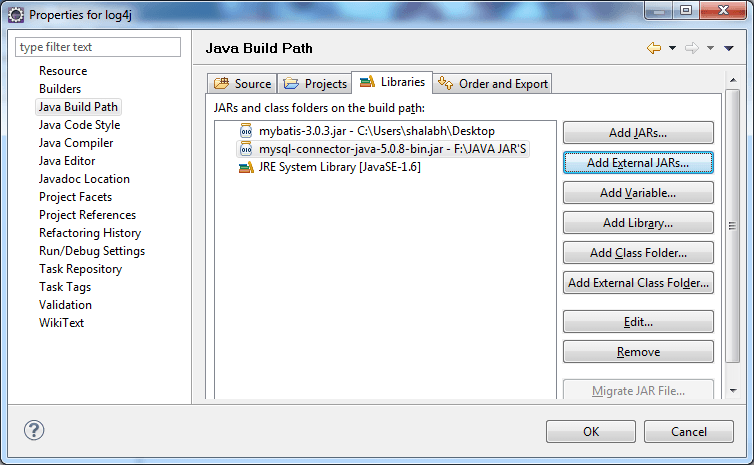
Step 1
First download the require jarsmybatis3.jar
and as well as
mysql.jarFrom :
http://grepcode.com/snapshot/repo1.maven.org/maven2/org.mybatis/mybatis/3.0.3
http://dev.mysql.com/downloads/connector/j/5.0.php
Step 2
Add mybatis3.jar and mysql.jar into classpath by rightclick on project>> properties >> java buildpath >> add external jars >> browse for mybatis3.jar and mysql.jar >> click OK.


