

Introduction To Logback
Logback is a higher version of Log4j project. It was developed by Ceki Gülcü, log4j's founder. Logback is faster and has a smaller footprint than all existing logging Api, sometimes by a wide margin. Just as importantly, logback offers unique and rather useful features missing in other logging systems.
Logback Modules:
- logback-core module lays the groundwork for the other two modules logback-classic module and logback-access module.
- logback-classic module can be assimilated to a significantly improved version of log4j. Moreover, logback-classic natively implements the SLF4J API so that you can readily switch back and forth between logback and other logging frameworks such as log4j or java.util.logging (JUL).
- logback-access module integrates with Servlet containers, such as Tomcat and Jetty, to provide HTTP-access log functionality. Note that you could easily build your own module on top of logback-core.
- Logger
- Appender
- Layout
Logger class is a part of logback-classic module. Appender and Layout both are part of logback-core module, logback-core has no notion of loggers.
Features Of Logback
- Faster implementation.
- Extensive battery of tests.
- logback-classic speaks SLF4J natively
- Extensive documentation.
- Configuration files in XML or Groovy.
- Automatic reloading of configuration files.
- Graceful recovery from I/O failures.
- Automatic removal of old log archives.
- Automatic compression of archived log files.
- Conditional processing of configuration files.
- Filters.
- SiftingAppender.
- Stack traces with packaging data.
Logback Configuration in Eclipse
- Step-1 Download logback jar file from http://logback.qos.ch/download.php
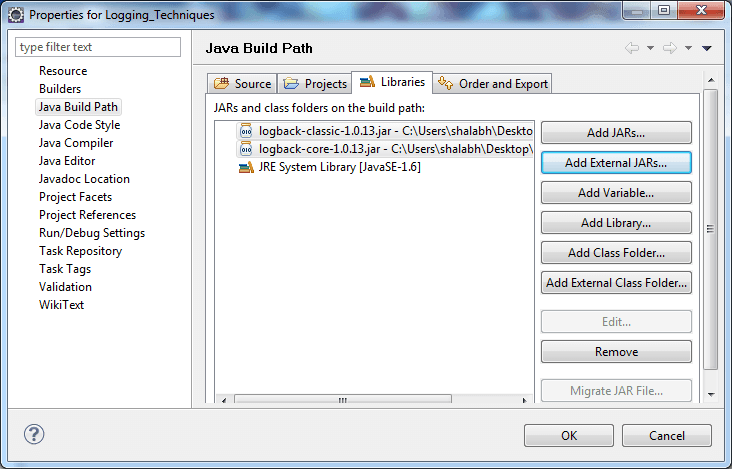
- Step-2 Add logback jars into classpath by rightclick on project >> properties >> java buildpath >> add external jars >> browse for logback jars >> click OK.
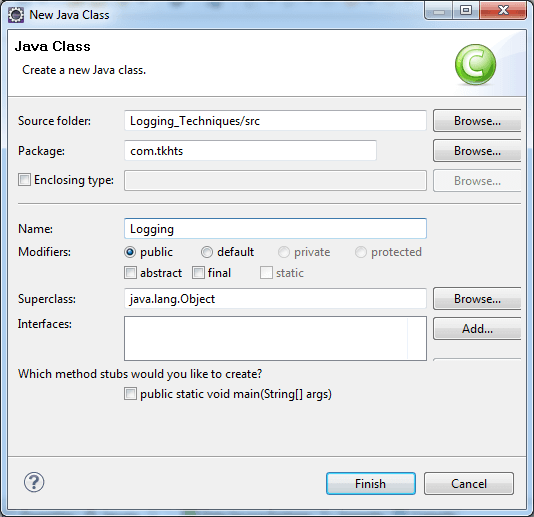
- Step-3 Create java class by right-click on project >> New >> class >> class name >> finish.
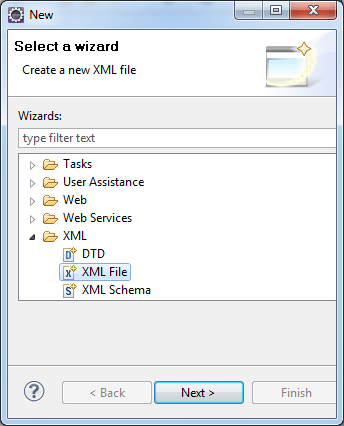
- Step-4 Create logback.xml file by right-click on project >> New >> others >> XML >> XML file.
For Example of Logback:
Reasons To Prefer Logback Over Log4j
As Logback is higher version it brings numerous improvement over log4j. Logback is conceptually very similar to log4j as both projects were founded by the same developer. If you are familiar with log4j, it will be easy to use logback.
Difference Between Logback And Log4j
| License | Apache(open source) | LGPL(open Source) |
| Vendors | Apache | QOS |
| Log filter message |
|
|
| Log categories or sessions | It supports | It supports |
| Tracing method invocation | Text only | Text only |
| Logging objects and arrays | Yes, it supports | don't supports |
| Asynchronous logging and backlog queues | Async-only | don't supports |
| Live monitoring via network or pipes | It supports | don't supports |
| Graphical viewer application | It supports | don't supports |


