

Introduction To Log4j
Log4j is a popular logging package written in Java.
Log4j is highly configurable through external configuration files at runtime. It views the logging process in terms of levels of priorities and offers mechanisms to direct logging information to a great variety of destinations, such as a database, file, console, UNIX Syslog etc.
Log4j has three main components:
- loggers
- appenders
- layouts
Features Of Log4j
- log4j is thread-safe.
- log4j is optimized for speed.
- log4j is based on a named logger hierarchy.
- log4j supports internationalization.
- log4j is designed to handle Java Exceptions.
- log4j uses multiple levels, namely ALL, TRACE, DEBUG, INFO, WARN, ERROR and FATAL.
- The format of the log output can be easily changed by extending the Layout class.
Log4j Configuration in Eclipse
- Step-1 Download log4j jar file from http://logging.apache.org/log4j/1.2/download.php
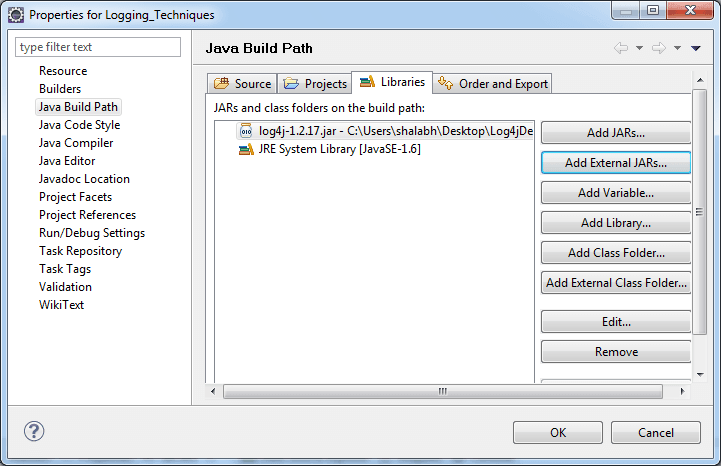
- Step-2 Add log4j-1.2.17.jar into classpath by rightclick on project >> properties >> java buildpath >> add external jars >> browse for log4j-1.2.17.jar >> click OK.
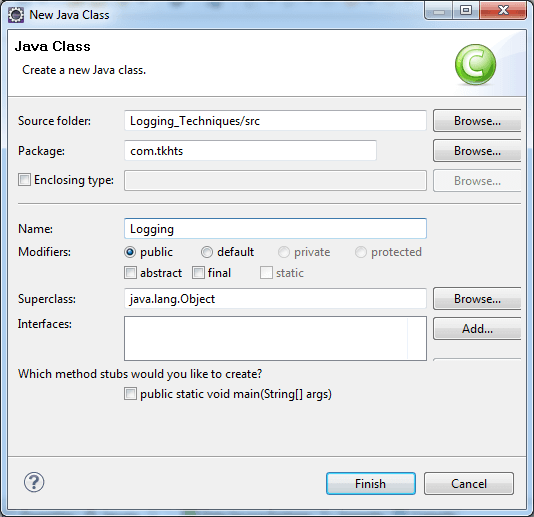
- Step-3 Create java class by right-click on project >> New >> class >> class name >> finish.
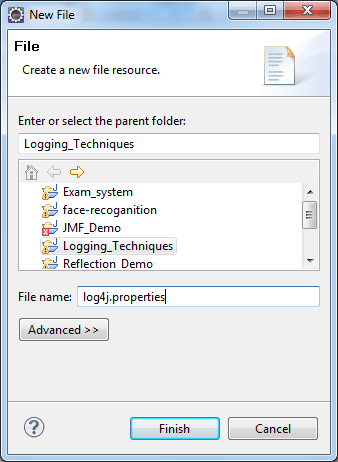
- Step-4 Create log4j.properties file by right-click on project >> New >> file.
Example Of Log4j
TestLog4JDemo.java
import org.apache.log4j.Logger;

public class TestLog4JDemo
{
	private Logger logger =
		Logger.getLogger(TestLog4JDemo.class);
	void calculation()
	{
		logger.debug("Calculation method code starts");
		int a = 100;
		int b = 20;
		int c = 30;
		int d = 0;
		int e = a *b + c-d;
		System.out.println("Now Result is "+e);
		logger.debug("Calculation method ends");
	}
	public static void main(String[] args)
	{
		TestLog4JDemo testObject = new TestLog4JDemo();
		testObject.calculation();

	}

}
log4j.properties
log4j.rootLogger=ALL,console
log4j.appender.console =
	org.apache.log4j.ConsoleAppender
log4j.appender.console.layout =
	org.apache.log4j.PatternLayout
log4j.appender.console.layout.ConversionPattern =
	%d %p %t %c - %m%n

# Output to stdout
#log4j.rootLogger=INFO, stdout

#output to file
#log4j.rootLogger=DEBUG, file

#output to stdout, file
#log4j.rootLogger=INFO, file, stdout

# Direct log messages to stdout
#log4j.appender.stdout=org.apache.log4j.ConsoleAppender
#log4j.appender.stdout.Target=System.out
#log4j.appender.stdout.layout=
	org.apache.log4j.PatternLayout
#log4j.appender.stdout.layout.ConversionPattern=
	%d{yyyy-MM-dd HH:mm:ss}
	%-5p %c{1}:%L - %m%n

# Direct log messages to a log file
#log4j.appender.file=
	org.apache.log4j.RollingFileAppender
#log4j.appender.file.File=
	e:\\ducat\\log\\loging.log
#log4j.appender.file.MaxFileSize=1MB
#log4j.appender.file.MaxBackupIndex=1
#log4j.appender.file.layout=
	org.apache.log4j.PatternLayout
#log4j.appender.file.layout.ConversionPattern=
	%d{yyyy-MM-dd HH:mm:ss}
	%-5p %c{1}:%L - %m%n
Output
2013-05-29 15:54:20,821 DEBUG main TestLog4JDemo - Calculation method code starts
Now Result is 2030
2013-05-29 15:54:20,822 DEBUG main TestLog4JDemo - Calculation method ends


