Examples of AWT
Components in AWT
To make Frame in AWT to add ComponentLabel in AWT
LabelDemo.java
import java.awt.Button;
import java.awt.Dimension;
import java.awt.Font;
import java.awt.Frame;
import java.awt.Label;
import java.awt.Rectangle;
import java.awt.SystemColor;
import java.awt.event.ActionEvent;
import java.awt.event.ActionListener;
public class LabelDemo extends Frame
{
	private Label label1 = new Label();
	private Label label2 = new Label();
	private Button button1 = new Button();
	private Button button2 = new Button();
	private Button button3 = new Button();
	public LabelDemo()
	{
		try
		{
			jbInit();
		}
		catch (Exception e)
		{
	      e.printStackTrace();
	    }
	}
	private void jbInit() throws Exception
	{
		this.setLayout( null );
		this.setSize(new Dimension(451, 300));
		this.setBackground( SystemColor.control );
		label1.setText("Label for Demonstration");
		label1.setBounds(new Rectangle(25, 45, 380, 35));
		label1.setFont(new Font("Tahoma", 1, 14));
		label1.setBackground(new java.awt.Color(247, 255, 214));
		label1.setForeground(java.awt.Color.red);
		label2.setText("Set the alignment of Label");
		label2.setBounds(new Rectangle(65, 135, 280, 15));
		label2.setFont(new Font("Tahoma", 1, 12));
		button1.setLabel("Left");
		button1.setBounds(new Rectangle(60, 170, 70, 25));
		button1.setFont(new Font("Tahoma", 1, 12));
		button1.addActionListener(
		new ActionListener()
			{
				public void actionPerformed(ActionEvent e)
				{
					button1_actionPerformed(e);
				}
			}
		);
		button2.setLabel("Center");
		button2.setBounds(new Rectangle(150, 170, 80, 25));
		button2.setFont(new Font("Tahoma", 1, 12));
		button2.addActionListener(
		new ActionListener()
			{
				public void actionPerformed(ActionEvent e)
				{
					button2_actionPerformed(e);
				}
			}
		);
		button3.setLabel("Right");
		button3.setBounds(new Rectangle(255, 170, 70, 25));
		button3.setFont(new Font("Tahoma", 1, 12));
		button3.addActionListener(
		new ActionListener()
			{
				public void actionPerformed(ActionEvent e)
				{
					button3_actionPerformed(e);
				}
			}
		);
		this.add(button3, null);
		this.add(button2, null);
		this.add(button1, null);
		this.add(label2, null);
		this.add(label1, null);
	}

	private void button1_actionPerformed(ActionEvent e)
	{
		label1.setAlignment(0);
	}

	private void button2_actionPerformed(ActionEvent e)
	{
		label1.setAlignment(1);
	}

	private void button3_actionPerformed(ActionEvent e)
	{
		label1.setAlignment(2);
	}
	public static void main(String args[])
	{
		LabelDemo obj=new LabelDemo();
		obj.setVisible(true);
		obj.setLocation(150,150);
	}
}
Output
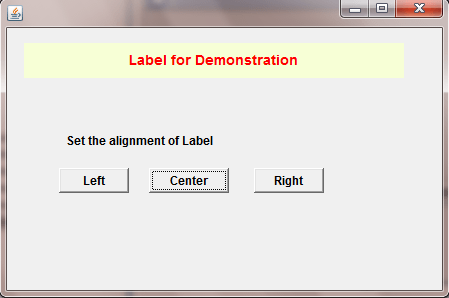
To change alignment of Text on Label by click on Button
Label in AWT
LabelDemo.java
import java.awt.Button;
import java.awt.Dimension;
import java.awt.Font;
import java.awt.Frame;
import java.awt.Label;
import java.awt.Rectangle;
import java.awt.SystemColor;
import java.awt.event.ActionEvent;
import java.awt.event.ActionListener;
public class LabelDemo extends Frame
{
	private Label label1 = new Label();
	private Label label2 = new Label();
	private Button button1 = new Button();
	private Button button2 = new Button();
	private Button button3 = new Button();
	public LabelDemo()
	{
		try
		{
			jbInit();
		}
		catch (Exception e)
		{
	      e.printStackTrace();
	    }
	}
	private void jbInit() throws Exception
	{
		this.setLayout( null );
		this.setSize(new Dimension(451, 300));
		this.setBackground( SystemColor.control );
		label1.setText("Label for Demonstration");
		label1.setBounds(new Rectangle(25, 45, 380, 35));
		label1.setFont(new Font("Tahoma", 1, 14));
		label1.setBackground(new java.awt.Color(247, 255, 214));
		label1.setForeground(java.awt.Color.red);
		label2.setText("Set the alignment of Label");
		label2.setBounds(new Rectangle(65, 135, 280, 15));
		label2.setFont(new Font("Tahoma", 1, 12));
		button1.setLabel("Left");
		button1.setBounds(new Rectangle(60, 170, 70, 25));
		button1.setFont(new Font("Tahoma", 1, 12));
		button1.addActionListener(
		new ActionListener()
			{
				public void actionPerformed(ActionEvent e)
				{
					button1_actionPerformed(e);
				}
			}
		);
		button2.setLabel("Center");
		button2.setBounds(new Rectangle(150, 170, 80, 25));
		button2.setFont(new Font("Tahoma", 1, 12));
		button2.addActionListener(
		new ActionListener()
			{
				public void actionPerformed(ActionEvent e)
				{
					button2_actionPerformed(e);
				}
			}
		);
		button3.setLabel("Right");
		button3.setBounds(new Rectangle(255, 170, 70, 25));
		button3.setFont(new Font("Tahoma", 1, 12));
		button3.addActionListener(
		new ActionListener()
			{
				public void actionPerformed(ActionEvent e)
				{
					button3_actionPerformed(e);
				}
			}
		);
		this.add(button3, null);
		this.add(button2, null);
		this.add(button1, null);
		this.add(label2, null);
		this.add(label1, null);
	}

	private void button1_actionPerformed(ActionEvent e)
	{
		label1.setAlignment(0);
	}

	private void button2_actionPerformed(ActionEvent e)
	{
		label1.setAlignment(1);
	}

	private void button3_actionPerformed(ActionEvent e)
	{
		label1.setAlignment(2);
	}
	public static void main(String args[])
	{
		LabelDemo obj=new LabelDemo();
		obj.setVisible(true);
		obj.setLocation(150,150);
	}
}
Output
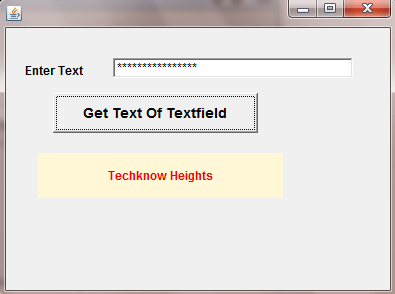
To make Password type TextField and get their hidden value
TextField in AWT
TextfieldDemo.java
package com.techknow.textfields;

import java.awt.Button;
import java.awt.Dimension;
import java.awt.Font;
import java.awt.Frame;
import java.awt.Label;
import java.awt.Rectangle;
import java.awt.SystemColor;
import java.awt.TextField;
import java.awt.event.ActionEvent;
import java.awt.event.ActionListener;

public class TextfieldDemo extends Frame
{
	private TextField textField1 = new TextField();
	private Button button1 = new Button();
	private Label label1 = new Label();
	private Label label2 = new Label();

	public TextfieldDemo()
	{
		try
		{
			jbInit();
		}
		catch (Exception e)
		{
			e.printStackTrace();
		}
	}

	private void jbInit() throws Exception
	{
		this.setLayout( null );
		this.setSize( new Dimension( 400, 300 ) );
		this.setBackground( SystemColor.control );
		textField1.setBounds(new Rectangle(115, 60, 240, 20));
		textField1.setEchoChar('*');
		button1.setLabel("Get Text Of Textfield");
		button1.setBounds(new Rectangle(55, 95, 205, 40));
		button1.setFont(new Font("Tahoma", 1, 14));
		button1.addActionListener(
		new ActionListener()
		{
			public void actionPerformed(ActionEvent e)
			{
				button1_actionPerformed(e);
			}
		}
		);
		label1.setBounds(new Rectangle(40, 155, 245, 45));
		label1.setFont(new Font("Tahoma", 1, 12));
		label1.setAlignment(1);
		label1.setBackground(new java.awt.Color(255, 247, 214));
		label1.setForeground(java.awt.Color.red);
		label2.setText("Enter Text");
		label2.setBounds(new Rectangle(25, 65, 75, 15));
		label2.setFont(new Font("Tahoma", 1, 12));
		this.add(label2, null);
		this.add(label1, null);
		this.add(button1, null);
		this.add(textField1, null);
	}
	public static void main(String args[])
	{
		TextfieldDemo obj=new TextfieldDemo();
		obj.setVisible(true);
		obj.setLocation(150,150);
	}

	private void button1_actionPerformed(ActionEvent e)
	{
		String str=textField1.getText();
		label1.setText(str);
	}
}
Output
To take multiple line input from user by TextArea
TextArea in AWT
TextAreaDemo.java
package com.techknow.textarea;

import java.awt.Dimension;
import java.awt.Font;
import java.awt.Frame;
import java.awt.Rectangle;
import java.awt.SystemColor;
import java.awt.TextArea;

public class TextAreaDemo extends Frame
{
	private TextArea textArea1 = new TextArea();

	public TextAreaDemo()
	{
		try
		{
			jbInit();
		}
		catch (Exception e)
		{
			e.printStackTrace();
		}
	}

	private void jbInit() throws Exception
	{
		this.setLayout( null );
		this.setSize(new Dimension(412, 319));
		this.setBackground( SystemColor.control );
		this.setTitle("Text Area Demo");
		this.setFont(new Font("Dialog", 1, 12));
		textArea1.setBounds(new Rectangle(5, 25, 395, 275));
		this.add(textArea1, null);
	}

	public static void main(String args[])
	{
		TextAreaDemo obj=new TextAreaDemo();
		obj.setVisible(true);
		obj.setLocation(150,150);
	}
}
Output

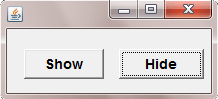
To change Text by Click on Button
Button in AWT
ButtonDemo.java
package com.techknow.buttonDemo;

import java.awt.Button;
import java.awt.Dimension;
import java.awt.Font;
import java.awt.Frame;
import java.awt.Rectangle;
import java.awt.SystemColor;
import java.awt.event.ActionEvent;
import java.awt.event.ActionListener;

public class ButtonDemo extends Frame
{

	private Button button1 = new Button();
	private Button button2 = new Button();

	public ButtonDemo()
	{
		try
		{
			jbInit();
		}
		catch (Exception e)
		{
			e.printStackTrace();
		}
	}

	private void jbInit() throws Exception
	{
		this.setLayout( null );
		this.setSize(new Dimension(247, 114));
		this.setBackground( SystemColor.control );
		this.setResizable(false);
		button1.setLabel("Show");
		button1.setBounds(new Rectangle(25, 50, 80, 30));
		button1.setFont(new Font("Tahoma", 1, 14));
		button1.addActionListener(
		new ActionListener()
			{
				public void actionPerformed(ActionEvent e)
				{
					button1_actionPerformed(e);
				}
			}
	      );
	button2.setLabel("Hide");
	button2.setBounds(new Rectangle(120, 50, 85, 30));
	button2.setFont(new Font("Tahoma", 1, 14));
	button2.addActionListener(
	new ActionListener()
		{
			public void actionPerformed(ActionEvent e)
			{
				button2_actionPerformed(e);
			}
		}
	);
	this.add(button2, null);
	this.add(button1, null);
	}

	public static void main(String args[])
	{
		ButtonDemo obj=new ButtonDemo();
		obj.setSize(220,102);
		obj.setLocation(150,150);
		obj.setVisible(true);
	}

	private void button1_actionPerformed(ActionEvent e)
	{
		button1.setLabel("Hide");
		button2.setLabel("Show");

	}

	private void button2_actionPerformed(ActionEvent e)
	{
		button2.setLabel("Hide");
		button1.setLabel("Show");

	}
}
Output
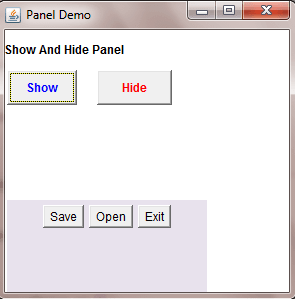
To show and hide Panel by click on Button
Panel in AWT
PanelDemo.java
package com.techknow.panel;

import java.awt.BorderLayout;
import java.awt.Button;
import java.awt.Color;
import java.awt.Font;
import java.awt.Frame;
import java.awt.Label;
import java.awt.Panel;
import java.awt.Rectangle;
import java.awt.event.ActionEvent;
import java.awt.event.ActionListener;

public class PanelDemo extends Frame implements ActionListener
{
	private Panel panel1 = new Panel();
    private Panel panel2 = new Panel();
    Button ok = new Button("Show");
    Button cancel = new Button("Hide");
    Button save = new Button("Save");
    Button open = new Button("Open");
    Button exit = new Button("Exit");
	private Label label1 = new Label();

	public PanelDemo()
	{
		try
		{
			jbInit();
		}
		catch (Exception e)
		{
			e.printStackTrace();
        }
	}

	public static void main(String[] args)
	{
		PanelDemo panelDemo = new PanelDemo();
		panelDemo.setSize(300,300);
        panelDemo.setVisible(true);
    }

    private void jbInit() throws Exception
    {
	    this.setLayout(null);
	    this.setTitle("Panel Demo");
	    panel1.setBounds(new Rectangle(0, 0, 395, 120));
	    panel1.setLayout(null);
	    panel1.add(label1, null);
	    panel1.add(ok);
	    panel1.add(cancel, null);
	    this.add(panel1);
	    panel1.setSize(200, 200);
	    ok.setBounds(10, 20, 50, 50);
	    cancel.setBounds(90, 20, 50, 50);
	    ok.setBounds(new Rectangle(10, 70, 70, 35));
	    ok.setFont(new Font("Tahoma", 1, 12));
	    ok.setForeground(Color.blue);
	    ok.addActionListener(this);
	    cancel.setBounds(new Rectangle(100, 70, 75, 35));
	    cancel.setFont(new Font("Tahoma", 1, 12));
	    cancel.setForeground(Color.red);
	    cancel.addActionListener(
	    	new PanelDemo_cancel_actionAdapter(this)
	    );
	    exit.addActionListener(this);
	    label1.setText("Show And Hide Panel");
	    label1.setBounds(new Rectangle(5, 35, 240, 30));
	    label1.setFont(new Font("Tahoma", 1, 12));
	    panel1.setLayout(null);

	    panel2.setBounds(new Rectangle(10, 200, 395, 265));
	    panel2.setSize(200, 200);
	    panel2.setBackground(new Color(232, 226, 237));
	    save.setBounds(10, 220, 50, 50);
	    open.setBounds(90, 220, 50, 50);
	    exit.setBounds(140, 220, 50, 50);
	    panel2.add(save);
	    panel2.add(open);
	    panel2.add(exit);
	    this.add(panel2);
	    panel2.setVisible(false);
    }

    public void actionPerformed(ActionEvent e)
    {
        panel2.setVisible(true);
    }

	void cancel_actionPerformed(ActionEvent e)
	{
	    panel2.setVisible(false);
	}

	void exit_actionPerformed(ActionEvent e)
	{
		System.exit(0);
	}
}

final class PanelDemo_cancel_actionAdapter implements ActionListener
{
	private PanelDemo adaptee;

	PanelDemo_cancel_actionAdapter(PanelDemo adaptee)
	{
		this.adaptee = adaptee;
	}

	public void actionPerformed(ActionEvent e)
	{
		adaptee.cancel_actionPerformed(e);
	}
}
Output
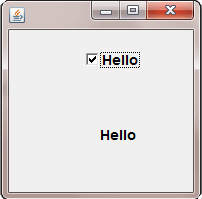
To get choice of user on property change event of CheckBox
CheckBox in AWT
CheckBoxDemo.java
package com.techknow.checkbox;

import java.awt.Button;
import java.awt.Checkbox;
import java.awt.Dimension;
import java.awt.Font;
import java.awt.Frame;
import java.awt.Label;
import java.awt.Rectangle;
import java.awt.SystemColor;
import java.awt.event.ActionEvent;
import java.awt.event.ActionListener;

import java.awt.event.MouseAdapter;

import java.awt.event.MouseEvent;

import java.beans.PropertyChangeEvent;
import java.beans.PropertyChangeListener;

public class CheckBox extends Frame
{
	private Checkbox checkbox1 = new Checkbox();
	private Label label1 = new Label();
	private Label label2 = new Label();
	private boolean counter=true;

	public CheckBox()
	{
		try
		{
			jbInit();
		}
		catch (Exception e)
		{
			e.printStackTrace();
		}
	}

	private void jbInit() throws Exception
	{
		this.setLayout( null );
		this.setSize(new Dimension(270, 202));
		this.setBackground( SystemColor.control );
		checkbox1.setLabel("Hello");
		checkbox1.setBounds(new Rectangle(85, 40, 105, 40));
		checkbox1.setFont(new Font("Tahoma", 1, 14));
		checkbox1.addMouseListener(
		new MouseAdapter()
		{
			public void mouseClicked(MouseEvent e)
			{
				checkbox1_mouseClicked(e);
			}
		});
		label1.setBounds(new Rectangle(0, 100, 230, 70));
		label1.setAlignment(1);
		label1.setFont(new Font("Tahoma", 1, 14));
		label2.setText("Check any Checkbox");
		label2.setBounds(new Rectangle(35, 5, 170, 25));
		label2.setFont(new Font("Tahoma", 1, 14));
		label2.setAlignment(1);
		this.add(label2, null);
		this.add(label1, null);
		this.add(checkbox1, null);
	}

	public static void main(String args[])
	{
		CheckBox obj=new CheckBox();
		obj.setSize(200,200);
		obj.setVisible(true);
		obj.setLocation(150,150);
	}

	private void checkbox1_mouseClicked(MouseEvent e)
	{
		if(counter)
		{
			String str=checkbox1.getLabel();
			label1.setText(" "+str);
			counter=false;
		}
		else
		{
			String str=checkbox1.getLabel();
			label1.setText(" ");
			counter=true;
		}
	}
}
Output
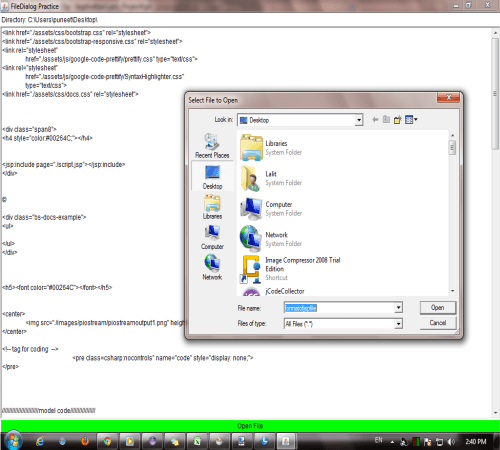
To open file using FileDialog
FileDialog in AWT
FileDialogDemo.java
import java.io.*;
import java.awt.*;
import java.awt.event.*;

public class FileDialogDemo extends Frame implements ActionListener
{
	FileDialog fd1;
	Button openPlease;
	Label lab1;
	TextArea ta1;
	public FileDialogDemo()
	{
		fd1 = new FileDialog(this, "Select File to Open");
		openPlease = new Button("Open File");
		openPlease.setBackground(Color.green);
		lab1 = new Label("Complete path of the selected file");
		ta1 = new TextArea(40, 20);
		add(openPlease, "South");
		add(ta1, "Center");
		add(lab1, "North");
		openPlease.addActionListener(this);
		setTitle("FileDialog Practice");
		setSize(525, 325);
		setVisible(true);

		// a shortcut to close the frame
		addWindowListener(
		new WindowAdapter()
		{
			public void windowClosing(WindowEvent e)
			{
				System.exit(0);
			}
		});
	}
	public void actionPerformed(ActionEvent e)
	{
		fd1.setVisible(true);
		lab1.setText("Directory: " + fd1.getDirectory());
		display(fd1.getDirectory() + fd1.getFile());
	}
	public void display(String fname)
	{
		// this method is for reading a file
		try
		{
			FileInputStream fis1 = new FileInputStream(fname);
			int fileSize = fis1.available();
			byte buf1[] = new byte[fileSize];
			fis1.read(buf1);
			String str1 = new String(buf1);
			ta1.setText(str1);
		}
		catch(IOException e)
		{
			System.exit(0);
		}
	}

	public static void main(String args[])
	{
		new FileDialogDemo();
	}
}
Output
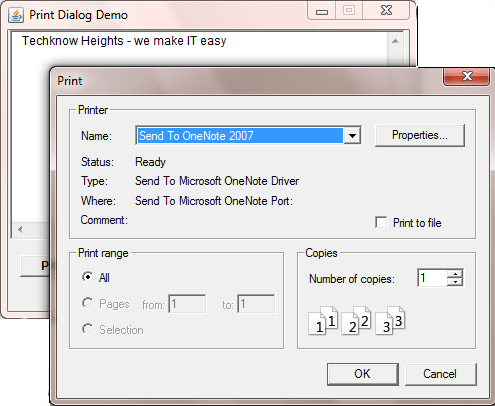
To send print command to print document using PrintDialog
PrintDialog in AWT
PrintDialogDemo.java
package com.techknow.printdialog;

import java.awt.Button;
import java.awt.Dimension;
import java.awt.Font;
import java.awt.Frame;
import java.awt.Rectangle;
import java.awt.SystemColor;
import java.awt.TextArea;
import java.awt.event.ActionEvent;
import java.awt.event.ActionListener;
import java.awt.print.PrinterJob;
import javax.print.PrintService;

public class PrintDialogDemo extends Frame
{
	private Button button1 = new Button();
	private TextArea textArea1 = new TextArea();

	public PrintDialogDemo()
	{
		try
		{
			jbInit();
		}
		catch (Exception e)
		{
			e.printStackTrace();
		}
	}

	private void jbInit() throws Exception
	{
		this.setLayout( null );
		this.setSize(new Dimension(407, 309));
		this.setBackground( SystemColor.control );
		this.setTitle("Print Dialog Demo");
		this.setVisible(true);
		this.setResizable(false);
		this.setLocation(250,200);
		button1.setLabel("Print");
		button1.setBounds(new Rectangle(15, 250, 70, 22));
		button1.setFont(new Font("Tahoma", 1, 12));
		button1.addActionListener(
		new ActionListener()
		{
			public void actionPerformed(ActionEvent e)
			{
				button1_actionPerformed(e);
			}
		});
		textArea1.setBounds(new Rectangle(5, 25, 395, 210));
		this.add(textArea1, null);
		this.add(button1, null);
	}

	public static void main(String args[])
	{
		new PrintDialogDemo();
	}

	private void button1_actionPerformed(ActionEvent e)
	{
			// PrinterJob Class controls printing to a particular
			// print service (such as a printer or fax capability)
		PrinterJob printJob = PrinterJob.getPrinterJob();

		PrintService printer = printJob.getPrintService();

		printJob.printDialog();
	}
}
Output
To make drawing using Canvas
Canvas in AWT
CanvasDemo.java
package com.techknow.canvas;

import java.awt.Canvas;
import java.awt.Graphics;
import java.awt.PrintJob;
import java.awt.Toolkit;
import java.util.Properties;
import java.awt.Dimension;
import java.awt.Frame;
import java.awt.SystemColor;

public class CanvasDemo extends Frame
{
	MyCanvas canvas = new MyCanvas();

	public CanvasDemo()
	{
		add("Center", canvas);
		setSize(500, 500);
		setVisible(true);
		String name = "Test print job";
		Properties properties = new Properties();
		PrintJob pj = Toolkit.getDefaultToolkit().getPrintJob(
								CanvasDemo.this, name, properties);
		if (pj != null)
		{
			canvas.printAll(pj.getGraphics());
			pj.end();
		}
	}
	private void jbInit() throws Exception
	{
		this.setLayout( null );
		this.setSize(new Dimension(390, 217));
		this.setBackground( SystemColor.control );
	}
	public static void main(String args[])
	{
		CanvasDemo app = new CanvasDemo();
	}
}
MyCanvas.java
package com.techknow.canvas;

class MyCanvas extends Canvas
{
	public void paint(Graphics g)
	{
	    Dimension size = getSize();
	    int width = size.width;
	    int height = size.height;
	    int x1 = (int) (width * 0.1);
	    int x2 = (int) (width * 0.9);
	    int y1 = (int) (height * 0.1);
	    int y2 = (int) (height * 0.9);
	    g.drawRect(x1, y1, x2 - x1, y2 - y1);
	    g.drawOval(x1, y1, x2 - x1, y2 - y1);
	    g.drawLine(x1, y1, x2, y2);
	    g.drawLine(x2, y1, x1, y2);
	    String text = "Print Me! ";
	    text += text;
	    text += text;
	    g.drawString(text, x1, (int) ((y1 + y2) / 2));
	    g.dispose();
	}
}
Output
To make standard application by using Menu
Menu in AWT
MenuDemo.java
package com.techknow.menu;

import java.awt.Dimension;
import java.awt.Frame;
import java.awt.Menu;
import java.awt.MenuBar;
import java.awt.MenuItem;
import java.awt.SystemColor;
import java.awt.event.ActionEvent;
import java.awt.event.ActionListener;

import javax.swing.JOptionPane;

public class MenuDemo extends Frame
{
	private MenuBar menuBar1 = new MenuBar();
	private Menu menu1 = new Menu("File");
	private Menu menu2 = new Menu("Help");
	private MenuItem hello=new MenuItem("Hello");
	private MenuItem bye=new MenuItem("Bye");
	private MenuItem aboutus=new MenuItem("About Us");

	public MenuDemo()
	{
		try
		{
			jbInit();
		}
		catch (Exception e)
		{
			e.printStackTrace();
		}
	}

	private void jbInit() throws Exception
	{
		this.setLayout( null );
		this.setSize( new Dimension( 400, 300 ) );
		this.setBackground( SystemColor.control );
		this.setVisible(true);
		this.setLocation(150,150);

		this.setMenuBar(menuBar1);
		menu1.setLabel("File");
		hello.addActionListener(
		new ActionListener()
		{
			public void actionPerformed(ActionEvent e)
			{
				hello_actionPerformed(e);
			}
		});
		bye.addActionListener(new ActionListener()
		{
			public void actionPerformed(ActionEvent e)
			{
				bye_actionPerformed(e);
			}
		});
		aboutus.addActionListener(
		new ActionListener()
		{
			public void actionPerformed(ActionEvent e)
			{
				aboutus_actionPerformed(e);
			}
		});
		menu1.add(hello);
		menu1.add(bye);
		menu2.add(aboutus);
		menuBar1.add(menu1);menuBar1.add(menu2);
	}

	public static void main(String args[])
	{
		MenuDemo obj=new MenuDemo();
	}

	private void hello_actionPerformed(ActionEvent e)
	{
		JOptionPane.showMessageDialog(this,"Hello Friends" );
	}

	private void bye_actionPerformed(ActionEvent e)
	{
		JOptionPane.showMessageDialog(this,"Bye Friends" );
		System.exit(0);
	}

	private void aboutus_actionPerformed(ActionEvent e)
	{
		JOptionPane.showMessageDialog(
		   this,"Hey Friends this is the Techknow Heights Examples");
	}
}
Output
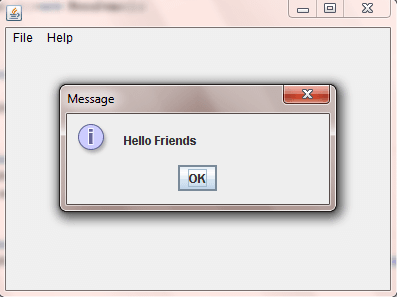
Usage of Sub Menu in your application
SubMenu in AWT
SubMenuDemo.java
package com.techknow.menu;

import java.awt.Dimension;
import java.awt.Frame;
import java.awt.Menu;
import java.awt.MenuBar;
import java.awt.MenuItem;
import java.awt.SystemColor;

public class SubMenuDemo extends Frame
{
	private MenuBar menuBar1 = new MenuBar();
	private Menu menu1 = new Menu("MenuBar");
	private Menu menu2 = new Menu("Menu");
	private MenuItem menu3 = new MenuItem("SubMenu");
	private MenuItem menu4 = new MenuItem("SubMenu");
	private MenuItem menu5 = new MenuItem("SubMenu");
	public SubMenuDemo()
	{
		try
		{
			jbInit();
		}
		catch (Exception e)
		{
			e.printStackTrace();
		}
	}

	private void jbInit() throws Exception
	{
		this.setLayout( null );
		this.setSize( new Dimension( 400, 300 ) );
		this.setBackground( SystemColor.control );
		this.setLocation(150,150);
		this.setVisible(true);
		this.setMenuBar(menuBar1);
		menuBar1.add(menu1);
		menu1.add(menu2);
		menu2.add(menu3);
		menu2.add(menu4);
		menu2.add(menu5);
	}
	public static void main(String args[])
	{
		SubMenuDemo obj=new SubMenuDemo();
	}
}
Output
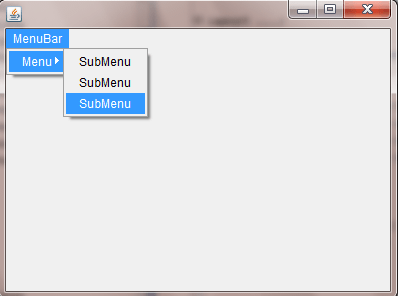
Heirarchy of menus in case Nested Menu under the SubMenu
Nested Menu in AWT
NestedMenuDemo.java
package com.techknow.menu;

import java.awt.Dimension;
import java.awt.Frame;
import java.awt.Menu;
import java.awt.MenuBar;
import java.awt.MenuItem;
import java.awt.SystemColor;

public class NestedMenuDemo extends Frame
{
	private MenuBar menuBar1 = new MenuBar();
	private Menu menu1 = new Menu("MenuBar");
	private Menu menu2 = new Menu("Menu");
	private MenuItem menu3 = new MenuItem("SubMenu");
	private MenuItem menu4 = new MenuItem("SubMenu");
	private Menu menu5 = new Menu("SubMenu");
	private MenuItem menu6 = new MenuItem("NestedMenu");
	private MenuItem menu7 = new MenuItem("NestedMenu");
	private MenuItem menu8 = new MenuItem("NestedMenu");
	public NestedMenuDemo()
	{
		try
		{
			jbInit();
		}
		catch (Exception e)
		{
			e.printStackTrace();
		}
	}

	private void jbInit() throws Exception
	{
		this.setLayout( null );
		this.setSize( new Dimension( 400, 300 ) );
		this.setBackground( SystemColor.control );
		this.setLocation(150,150);
		this.setVisible(true);
		this.setMenuBar(menuBar1);
		menuBar1.add(menu1);
		menu1.add(menu2);
		menu2.add(menu3);
		menu2.add(menu4);
		menu2.add(menu5);
		menu5.add(menu6);
		menu5.add(menu7);
		menu5.add(menu8);
	}

	public static void main(String args[])
	{
		NestedMenuDemo obj=new NestedMenuDemo();
	}
}
Output
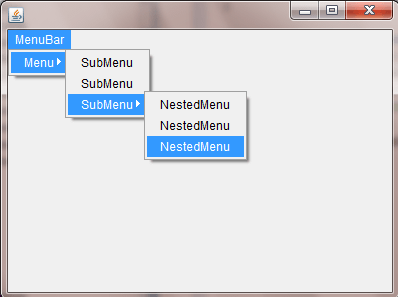
Layouts in AWT
Looking of your Frame when you set Border LayoutBorder Layout in AWT
BorderLayoutDemo.java
package com.techknow.layout;
import java.awt.BorderLayout;
import java.awt.Button;
import java.awt.Dimension;
import java.awt.Frame;
import java.awt.Rectangle;
import java.awt.SystemColor;
import java.awt.event.ActionEvent;
import java.awt.event.ActionListener;
import java.awt.event.WindowAdapter;
import java.awt.event.WindowEvent;
import javax.swing.JOptionPane;
public class BorderLayoutDemo extends Frame {
  private Button button1 = new Button();
  private Button button2 = new Button();
  private Button button3 = new Button();
  private Button button4 = new Button();
  private Button button5 = new Button();
  public BorderLayoutDemo() {
    try {
      jbInit();
    } catch (Exception e) {
      e.printStackTrace();
    }
  }
  private void jbInit() throws Exception {
    this.setLayout( null );
    this.setSize( new Dimension( 400, 300 ) );
    this.setBackground( SystemColor.control );
    this.setLayout(new BorderLayout());
    this.setVisible(true);
    this.setTitle("Border Layout Demo");
    this.addWindowListener(new WindowAdapter() {
        public void windowClosing(WindowEvent e) {
          this_windowClosing(e);
        }
      });
    this.setLocation(250,150);
    button1.setLabel("SOUTH");
    button1.setBounds(new Rectangle(30, 55, 70, 22));
    button1.addActionListener(new ActionListener() {
        public void actionPerformed(ActionEvent e) {
          button1_actionPerformed(e);
        }
      });
    button2.setLabel("NORTH");
    button2.setBounds(new Rectangle(240, 45, 70, 22));
    button2.addActionListener(new ActionListener() {
        public void actionPerformed(ActionEvent e) {
          button2_actionPerformed(e);
        }
      });
    button3.setLabel("WEST");
    button3.setBounds(new Rectangle(185, 100, 70, 22));
    button3.addActionListener(new ActionListener() {
        public void actionPerformed(ActionEvent e) {
          button3_actionPerformed(e);
        }
      });
    button4.setLabel("EAST");
    button4.setBounds(new Rectangle(215, 170, 70, 22));
    button4.addActionListener(new ActionListener() {
        public void actionPerformed(ActionEvent e) {
          button4_actionPerformed(e);
       }
      });
    button5.setLabel("CENTER");
    button5.setBounds(new Rectangle(130, 200, 70, 22));
    button5.addActionListener(new ActionListener() {
        public void actionPerformed(ActionEvent e) {
          button5_actionPerformed(e);
        }
      });
    this.add(button5, BorderLayout.CENTER);
    this.add(button4, BorderLayout.EAST);
    this.add(button3, BorderLayout.WEST);
    this.add(button2, BorderLayout.NORTH);
    this.add(button1, BorderLayout.SOUTH);
  }
  public static void main(String args[]) {
    new BorderLayoutDemo();
  }
  private void button5_actionPerformed(ActionEvent e) {
    JOptionPane.showMessageDialog(
    			this,"This is Center side of Frame");
  }
  private void button4_actionPerformed(ActionEvent e) {
    JOptionPane.showMessageDialog(
    			this,"This is East side of Frame");
  }
  private void button3_actionPerformed(ActionEvent e) {
    JOptionPane.showMessageDialog(
    			this,"This is West side of Frame");
  }
  private void button2_actionPerformed(ActionEvent e) {
    JOptionPane.showMessageDialog(
    			this,"This is North side of Frame");
  }
  private void button1_actionPerformed(ActionEvent e) {
    JOptionPane.showMessageDialog(
    			this,"This is South side of Frame");
  }
  private void this_windowClosing(WindowEvent e) {
    System.exit(0);
  }
}
Output
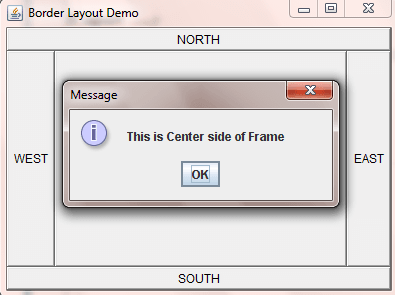
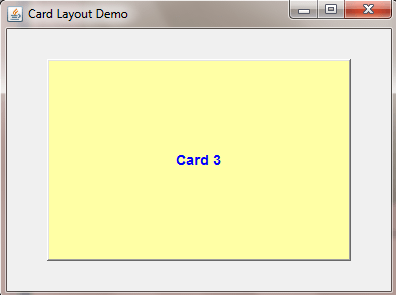
Looking of your Frame when you set Card Layout
Card Layout in AWT
CardLayoutDemo.java
package com.techknow.layout;
import java.awt.Button;
import java.awt.CardLayout;
import java.awt.Dimension;
import java.awt.Font;
import java.awt.Frame;
import java.awt.Rectangle;
import java.awt.SystemColor;
import java.awt.event.ActionEvent;
import java.awt.event.ActionListener;
import java.awt.event.WindowAdapter;
import java.awt.event.WindowEvent;
import javax.swing.JButton;
public class CardLayoutDemo extends Frame {
  private Button button1 = new Button();
  private Button button2 = new Button();
  private Button button3 = new Button();
CardLayout card=new CardLayout(40,30);
  public CardLayoutDemo() {
    try {
      jbInit();
    } catch (Exception e) {
      e.printStackTrace();
    }
  }
 private void jbInit() throws Exception
 {
    this.setLayout( null );
    this.setSize( new Dimension( 400, 300 ) );
    this.setBackground( SystemColor.control );
    this.setLayout(card);
    this.setVisible(true);
    this.setTitle("Card Layout Demo");
    this.addWindowListener(new WindowAdapter() {
        public void windowClosing(WindowEvent e) {
          this_windowClosing(e);
        }
      });
    this.setLocation(250,200);
    button1.setLabel("Card 1");
    button1.setFont(new Font("Tahoma", 1, 14));
    button1.setForeground(java.awt.Color.red);
    button1.setBackground(new java.awt.Color(214, 255, 239));
    button2.setBackground(new java.awt.Color(214, 214, 255));
    button3.setBackground(new java.awt.Color(255, 255, 165));
    button2.setFont(new Font("Tahoma", 1, 14));
    button2.setForeground(java.awt.Color.green);
    button3.setFont(new Font("Tahoma", 1, 14));
    button3.setForeground(java.awt.Color.blue);
    button1.addActionListener(new ActionListener() {
        public void actionPerformed(ActionEvent e) {
          button1_actionPerformed(e);
        }
      });
    button2.addActionListener(new ActionListener() {
        public void actionPerformed(ActionEvent e) {
          button2_actionPerformed(e);
        }
      });
    button3.addActionListener(new ActionListener() {
        public void actionPerformed(ActionEvent e) {
          button3_actionPerformed(e);
        }
      });
    button2.setLabel("Card 2");
    button3.setLabel("Card 3");
    this.add(button1, "a");
    this.add(button2, "b");
    this.add(button3, "c");
  }
  public static void main(String args[]) {
    new CardLayoutDemo();
  }
  private void this_windowClosing(WindowEvent e) {
    System.exit(0);
  }
  private void button1_actionPerformed(ActionEvent e) {
  card.next(this);
  }
  private void button2_actionPerformed(ActionEvent e) {
    card.next(this);
  }
  private void button3_actionPerformed(ActionEvent e) {
    card.next(this);
  }
}
Output
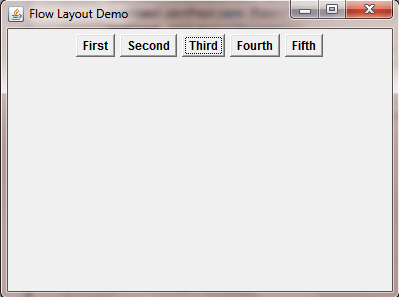
Looking of your Frame when you set Flow Layout
Flow Layout in AWT
FlowLayoutDemo.java
package com.techknow.layout;

import java.awt.Button;
import java.awt.Dimension;
import java.awt.FlowLayout;
import java.awt.Font;
import java.awt.Frame;
import java.awt.Rectangle;
import java.awt.SystemColor;
import java.awt.event.ActionEvent;
import java.awt.event.ActionListener;
import java.awt.event.WindowAdapter;
import java.awt.event.WindowEvent;


public class FlowLayoutDemo extends Frame {
  private Button button1 = new Button();
  private Button button2 = new Button();
  private Button button3 = new Button();
  private Button button4 = new Button();
  private Button button5 = new Button();
  FlowLayout flow=new FlowLayout(FlowLayout.CENTER);
  private Button button6 = new Button();

  public FlowLayoutDemo() {
    try {
      jbInit();
    } catch (Exception e) {
      e.printStackTrace();
    }
  }

  private void jbInit() throws Exception {
    this.setLayout( flow );
    this.setSize( new Dimension( 400, 300 ) );
    this.setBackground( SystemColor.control );
    this.setVisible(true);
    this.setTitle("Flow Layout Demo");
    this.addWindowListener(new WindowAdapter() {
        public void windowClosing(WindowEvent e) {
          this_windowClosing(e);
        }
      });
    this.setLocation(250,200);
    button1.setLabel("First");
    button1.setBounds(new Rectangle(290, 45, 70, 22));
    button1.setFont(new Font("Tahoma", 1, 12));
    button2.setLabel("Second");
    button2.setBounds(new Rectangle(205, 75, 70, 22));
    button2.setFont(new Font("Tahoma", 1, 12));
    button3.setLabel("Third");
    button3.setBounds(new Rectangle(195, 115, 70, 22));
    button3.setFont(new Font("Tahoma", 1, 12));
    button4.setLabel("Fourth");
    button4.setBounds(new Rectangle(180, 145, 70, 22));
    button4.setFont(new Font("Tahoma", 1, 12));
    button5.setLabel("Fifth");
    button5.setBounds(new Rectangle(130, 160, 70, 22));
    button5.setFont(new Font("Tahoma", 1, 12));
    button6.setLabel("button6");
    this.add(button1);
    this.add(button2);
    this.add(button3);
    this.add(button4);
    this.add(button5);
  }

  public static void main(String args[]) {
    new FlowLayoutDemo();
  }

  private void this_windowClosing(WindowEvent e) {
    System.exit(0);
  }
}
Output
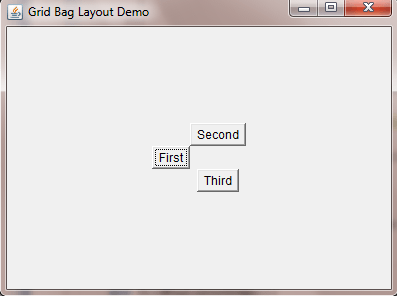
Looking of your Frame when you set GridBag Layout
GridBag Layout in AWT
GridBagLayoutDemo.java
package com.techknow.layout;

import java.awt.Button;
import java.awt.Dimension;
import java.awt.Frame;
import java.awt.GridBagConstraints;
import java.awt.GridBagLayout;
import java.awt.Insets;
import java.awt.SystemColor;
import java.awt.event.WindowAdapter;
import java.awt.event.WindowEvent;

public class GridBagLayoutDemo extends Frame {
  GridBagLayout gridBag=new GridBagLayout();
  private Button button1 = new Button();
  private Button button2 = new Button();
  private Button button3 = new Button();
  public GridBagLayoutDemo() {
    try {
      jbInit();
    } catch (Exception e) {
      e.printStackTrace();
    }
  }

  private void jbInit() throws Exception {
    this.setLayout( gridBag );
    this.setVisible(true);
    this.setLocation(250,200);
    this.setSize( new Dimension( 400, 300 ) );
    this.setBackground( SystemColor.control );
    this.setTitle("Grid Bag Layout Demo");
    this.addWindowListener(new WindowAdapter() {
        public void windowClosing(WindowEvent e) {
          this_windowClosing(e);
        }
      });
    button1.setLabel("First");
    button2.setLabel("Second");
    button3.setLabel("Third");
    this.add(button1, new GridBagConstraints(
						0, 1, 1, 1, 0.0, 0.0,
    					GridBagConstraints.CENTER,
    					GridBagConstraints.NONE,
    					new Insets(0, 0, 0, 0), 0, 0)
    				);
    this.add(button2, new GridBagConstraints(
    					1, 0, 1, 1, 0.0, 0.0,
    					GridBagConstraints.CENTER,
    					GridBagConstraints.NONE,
    					new Insets(0, 0, 0, 0), 0, 0)
    				);
    this.add(button3, new GridBagConstraints(
    					1, 2, 1, 1, 0.0, 0.0,
    					GridBagConstraints.CENTER,
    					GridBagConstraints.NONE,
    					new Insets(0, 0, 0, 0), 0, 0)
    				);
  }
  private void this_windowClosing(WindowEvent e) {
    System.exit(0);
  }
  public static void main(String args[]){
    new GridBagLayoutDemo();
  }
}
Output
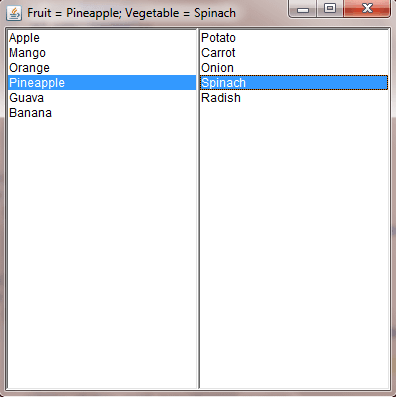
Looking of your Frame when you set Grid Layout
Grid Layout in AWT
GridLayoutDemo.java
package com.techknow.layout;

import java.awt.*;
import java.awt.event.*;

class GridLayoutDemo extends Frame{
	List l1,l2;
  	public GridLayoutDemo(){
  		// Set the frame properties
  		setTitle("GridLayout Demo");
 		setSize(400,400);
 		setLayout(new GridLayout());
 		setLocationRelativeTo(null);
 		setVisible(true);
  		// Create lists
 		l1=new List();
 		l2=new List();
  		// Add items to lists
 		l1.add("Apple");
 		l1.add("Mango");
 		l1.add("Orange");
 		l1.add("Pineapple");
 		l1.add("Guava");
 		l1.add("Banana");
  		l2.add("Potato");
 		l2.add("Carrot");
 		l2.add("Onion");
 		l2.add("Spinach");
 		l2.add("Radish");
  		// Add lists
 		add(l1);
 		add(l2);

  		// Add item listeners
 		l1.addItemListener(new ItemListener(){
   			public void itemStateChanged(ItemEvent ie){
   				setTitle("Fruit = "+l1.getSelectedItem()
   						+"; Vegetable = "+l2.getSelectedItem());
   			}
  		});

   		l2.addItemListener(new ItemListener(){
   			public void itemStateChanged(ItemEvent ie){
   				setTitle("Fruit = "+l1.getSelectedItem()
   						+"; Vegetable = "+l2.getSelectedItem());
   			}
  		});
  	}

 	public static void main(String args[]){
		 new GridLayoutDemo();
 	}
}
Output
Listeners in AWT
Restriction on TextField using KeyListenerKeyListener in AWT
KeyListenerDemo.java
package com.techknow.keylistener;

import java.awt.Dimension;
import java.awt.Font;
import java.awt.Frame;
import java.awt.Label;
import java.awt.Rectangle;
import java.awt.SystemColor;
import java.awt.TextField;
import java.awt.event.KeyAdapter;
import java.awt.event.KeyEvent;

import javax.swing.JOptionPane;

public class KeyListnerDemo extends Frame
{
	private TextField textField1 = new TextField();
	private Label label1 = new Label();
	private Label label2 = new Label();
	private TextField textField2 = new TextField();
	private Label label3 = new Label();

	public KeyListnerDemo()
	{
		try
		{
			jbInit();
		}
		catch (Exception e)
		{
			e.printStackTrace();
		}
	}

	private void jbInit() throws Exception
	{
		this.setLayout( null );
		this.setSize(new Dimension(389, 160));
		this.setBackground( SystemColor.control );
		this.setResizable(false);
		this.setTitle("Key Listener Demo");
		this.setVisible(true);
		this.setLocation(150,150);
		textField1.setBounds(new Rectangle(120, 65, 220, 20));
		textField1.addKeyListener(
		new KeyAdapter()
		{
			public void keyPressed(KeyEvent e)
			{
				textField1_keyPressed(e);
			}
		});
		label1.setText("Only Numbers");
		label1.setBounds(new Rectangle(15, 60, 100, 25));
		label1.setFont(new Font("Tahoma", 1, 12));
		label1.setForeground(java.awt.Color.red);
		label2.setText("Only Characters");
		label2.setBounds(new Rectangle(10, 100, 105, 20));
		label2.setFont(new Font("Tahoma", 1, 12));
		label2.setForeground(java.awt.Color.red);
		textField2.setBounds(new Rectangle(120, 105, 220, 20));
		textField2.addKeyListener(
		new KeyAdapter()
		{
			public void keyTyped(KeyEvent e)
			{
				textField2_keyTyped(e);
			}
		});
		label3.setText("Restriction on Text Field with Key Listener");
		label3.setBounds(new Rectangle(25, 35, 315, 15));
		label3.setFont(new Font("Tahoma", 1, 14));
		label3.setForeground(java.awt.Color.blue);
		this.add(label3, null);
		this.add(textField2, null);
		this.add(label2, null);
		this.add(label1, null);
		this.add(textField1, null);
	}

	private void textField1_keyPressed(KeyEvent e)
	{
		char c = e.getKeyChar();
		if (!(Character.isDigit(c)
			 ||  (c == KeyEvent.VK_BACK_SPACE)
			 || (c == KeyEvent.VK_DELETE)
			))
		{
			e.consume();
		}
	}

	private void textField2_keyTyped(KeyEvent e)
	{
		char c = e.getKeyChar();
		if ((Character.isDigit(c)
			 || (c == KeyEvent.VK_BACK_SPACE)
			 || (c == KeyEvent.VK_DELETE)
			))
		{
			e.consume();
		}

	}

	public static void main(String args[])
	{
		new KeyListnerDemo();
	}
}
Output
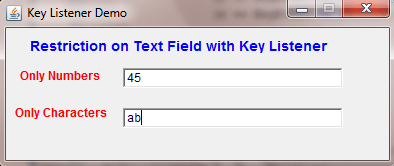
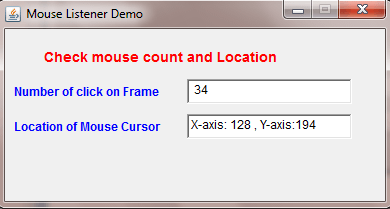
Find out number of clicks and Location where you click at the Frame
MouseListener in AWT
MouseListenerDemo.java
package com.techknow.mouselistener;

import java.awt.Button;
import java.awt.Dimension;
import java.awt.Font;
import java.awt.Frame;
import java.awt.Label;
import java.awt.Rectangle;
import java.awt.SystemColor;
import java.awt.TextField;
import java.awt.event.MouseAdapter;
import java.awt.event.MouseEvent;

public class MouseListenerDemo extends Frame
{
	private int count=0;
	private TextField textField1 = new TextField();
	private Label label1 = new Label();
	private Label label2 = new Label();
	private Label label3 = new Label();
	private TextField textField2 = new TextField();

	public MouseListenerDemo()
	{
		try
		{
			jbInit();
		}
		catch (Exception e)
		{
			e.printStackTrace();
		}
	}

	private void jbInit() throws Exception
	{
		this.setLayout( null );
		this.setVisible(true);
		this.setLocation(150,150);
		this.setSize(new Dimension(386, 200));
		this.setBackground( SystemColor.control );
		this.setResizable(false);
		this.setTitle("Mouse Listener Demo");
		this.addMouseListener(
		new MouseAdapter()
		{
			public void mouseClicked(MouseEvent e)
			{
				this_mouseClicked(e);
			}
		});
		textField1.setBounds(new Rectangle(185, 75, 165, 25));
		label1.setText("Number of click on Frame ");
		label1.setBounds(new Rectangle(10, 80, 170, 15));
		label1.setFont(new Font("Tahoma", 1, 12));
		label1.setForeground(java.awt.Color.blue);
		label2.setText("Check mouse count and Location");
		label2.setBounds(new Rectangle(40, 45, 290, 15));
		label2.setFont(new Font("Tahoma", 1, 14));
		label2.setForeground(java.awt.Color.red);
		label3.setText("Location of Mouse Cursor ");
		label3.setBounds(new Rectangle(10, 115, 170, 15));
		label3.setForeground(java.awt.Color.blue);
		label3.setFont(new Font("Tahoma", 1, 12));
		textField2.setBounds(new Rectangle(185, 110, 165, 25));
		this.add(textField2, null);
		this.add(label3, null);
		this.add(label2, null);
		this.add(label1, null);
		this.add(textField1, null);
	}

	private void this_mouseClicked(MouseEvent e)
	{
		int x=e.getX();
		int y=e.getY();
		count=count+1;
		textField1.setText(" "+count);
		textField2.setText("X-axis: "+ x + " , Y-axis:"+y);
	}

	public static void main(String args[])
	{
		new MouseListenerDemo();
	}
}
Output
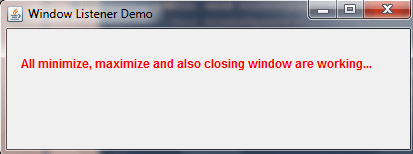
Minimize, Maximizeand and closing the Window
WindowListener in AWT
WindowListenerDemo.java
package com.techknow.windowlistener;

import java.awt.Dimension;
import java.awt.Font;
import java.awt.Frame;
import java.awt.Label;
import java.awt.Rectangle;
import java.awt.SystemColor;
import java.awt.event.WindowAdapter;
import java.awt.event.WindowEvent;

import javax.swing.JOptionPane;

public class WindowListenerDemo extends Frame
{
	private Label label1 = new Label();

	public WindowListenerDemo()
	{
		try
		{
			jbInit();
		}
		catch (Exception e)
		{
			e.printStackTrace();
		}
	}

	private void jbInit() throws Exception
	{
		this.setLayout( null );
		this.setVisible(true);
		this.setLocation(250,200);
		this.setSize(new Dimension(419, 158));
		this.setBackground( SystemColor.control );
		this.setTitle("Window Listener Demo");
		this.addWindowListener(
		new WindowAdapter()
		{
			public void windowClosing(WindowEvent e)
			{
				this_windowClosing(e);
			}
			public void windowOpened(WindowEvent e)
			{
				this_windowOpened(e);
			}
		});
		label1.setText("All minimize, maximize and
							also closing window are working...");
		label1.setBounds(new Rectangle(20, 0, 390, 130));
		label1.setFont(new Font("Tahoma", 1, 12));
		label1.setForeground(java.awt.Color.red);
		this.add(label1, null);
	}

	private void this_windowClosing(WindowEvent e)
	{
		System.exit(0);
	}

	public static void main(String args[])
	{
		new WindowListenerDemo();
	}

	private void this_windowOpened(WindowEvent e)
	{
		JOptionPane.showMessageDialog(this,
							"Welcome To Techknow Heights");
	}
}
Output
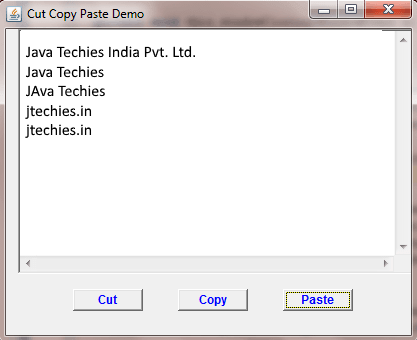
More Applications
Cut, Copy and Paste on FrameCut, Copy and Paste in AWT
CutCopyPasteDemo.java
package com.techknow.cutcopypaste;

import java.awt.Button;
import java.awt.Dimension;
import java.awt.Font;
import java.awt.Frame;
import java.awt.Rectangle;
import java.awt.SystemColor;
import java.awt.TextArea;
import java.awt.datatransfer.Clipboard;
import java.awt.datatransfer.DataFlavor;
import java.awt.datatransfer.StringSelection;
import java.awt.datatransfer.Transferable;
import java.awt.event.ActionEvent;
import java.awt.event.ActionListener;
import java.awt.event.WindowAdapter;
import java.awt.event.WindowEvent;

public class CutCopyPasteDemo extends Frame
{
	private TextArea textArea1 = new TextArea();
	private Clipboard clipbd=this.getToolkit().getSystemClipboard();
	private Button button1 = new Button();
	private Button button2 = new Button();
	private Button button3 = new Button();

	public CutCopyPasteDemo()
	{
		try
		{
			jbInit();
		}
		catch (Exception e)
		{
			e.printStackTrace();
		}
	}

	private void jbInit() throws Exception
	{
		this.setLayout( null );
		this.setVisible(true);
		this.setLocation(250,200);
		this.setSize(new Dimension(421, 344));
		this.setBackground( SystemColor.control );
		this.setTitle("Cut Copy Paste Demo");
		this.addWindowListener(
		new WindowAdapter()
		{
			public void windowClosing(WindowEvent e)
			{
				this_windowClosing(e);
			}
		});
		textArea1.setBounds(new Rectangle(20, 30, 395, 245));
		button1.setLabel("Cut");
		button1.setBounds(new Rectangle(75, 290, 70, 22));
		button1.setFont(new Font("Tahoma", 1, 12));
		button1.setForeground(java.awt.Color.blue);
		button1.addActionListener(
		new ActionListener()
		{
			public void actionPerformed(ActionEvent e)
			{
				button1_actionPerformed(e);
			}
		});
		button2.setLabel("Copy");
		button2.setBounds(new Rectangle(180, 290, 70, 22));
		button2.setFont(new Font("Tahoma", 1, 12));
		button2.setForeground(java.awt.Color.blue);
		button2.addActionListener(new ActionListener()
		{
			public void actionPerformed(ActionEvent e)
			{
				button2_actionPerformed(e);
			}
		});
		button3.setLabel("Paste");
		button3.setBounds(new Rectangle(285, 290, 70, 22));
		button3.setFont(new Font("Tahoma", 1, 12));
		button3.setForeground(java.awt.Color.blue);
		button3.addActionListener(
		new ActionListener()
		{
			public void actionPerformed(ActionEvent e)
			{
				button3_actionPerformed(e);
			}
		});
		this.add(button3, null);
		this.add(button2, null);
		this.add(button1, null);
		this.add(textArea1, null);
	}

	public static void main(String args[])
	{
		new CutCopyPasteDemo();
	}

	private void this_windowClosing(WindowEvent e)
	{
		System.exit(0);
	}

	private void button1_actionPerformed(ActionEvent e)
	{
		String selection = textArea1.getSelectedText();
		StringSelection clipString =  new StringSelection(selection);
		clipbd.setContents(clipString, clipString);
		textArea1.replaceRange("",textArea1.
 					getSelectionStart(),textArea1.getSelectionEnd());
	}

	private void button2_actionPerformed(ActionEvent e)
	{
		String selection = textArea1.getSelectedText();
		StringSelection clipString =  new StringSelection(selection);
		clipbd.setContents(clipString, clipString);
	}

	private void button3_actionPerformed(ActionEvent e)
	{
		Transferable clipData =  clipbd.getContents(this);
			try
			{
				String clipString =(String)clipData.getTransferData(DataFlavor.stringFlavor);
				textArea1.replaceRange(
						clipString,textArea1.getSelectionStart(),
						textArea1.getSelectionEnd()
					);
			}
			catch(Exception ex)
			{
				System.out.println("not String flavor");
			}
	}
}
Output
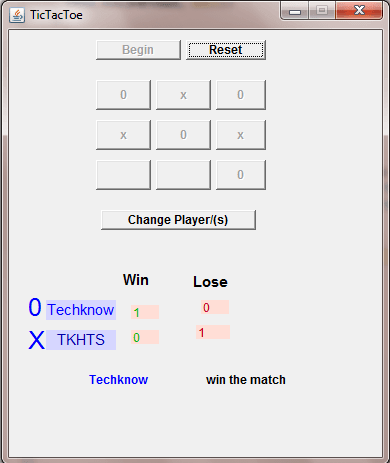
TicTacToe game
TicTacToe
TicTacToe.java
package com.tecknow.tictactoe;

import java.awt.Button;
import java.awt.Dimension;
import java.awt.Font;
import java.awt.Frame;
import java.awt.Label;
import java.awt.Rectangle;
import java.awt.SystemColor;
import java.awt.event.ActionEvent;
import java.awt.event.ActionListener;
import java.awt.event.WindowAdapter;
import java.awt.event.WindowEvent;
import javax.swing.JOptionPane;

public class TicTacToe extends Frame
{
	static boolean flage=true;
	static boolean winnerflage=true;
	static int counter;
	int player1Win;
	int player1Lose;
	int player2Win;
	int player2Lose;
	String playerName1;
	String playerName2;
	private Button button1 = new Button();
	private Button button2 = new Button();
	private Button button3 = new Button();
	private Button button4 = new Button();
	private Button button5 = new Button();
	private Button button6 = new Button();
	private Button button7 = new Button();
	private Button button8 = new Button();
	private Button button9 = new Button();
	private Button button10 = new Button();
	private Button button11 = new Button();
	private Label label3 = new Label();
	private Label label4 = new Label();
	private Label label5 = new Label();
	private Label label6 = new Label();
	private Button button12 = new Button();
	private Label label7 = new Label();
	private Label label8 = new Label();
	private Label label9 = new Label();
	private Label label10 = new Label();
	private Label label11 = new Label();
	private Label label12 = new Label();
	private Label label13 = new Label();
	private Label label14 = new Label();
	private Label label15 = new Label();

	public TicTacToe()
	{
		try
		{
			jbInit();
		}
		catch (Exception e)
		{
			e.printStackTrace();
		}
	}

	private void jbInit() throws Exception
	{
		this.setLayout( null );
		this.setLocation(300,200);
		this.setSize(new Dimension(379, 455));
		this.setBackground( SystemColor.control );
		this.setVisible(true);
		this.setForeground(java.awt.Color.black);
		this.setTitle("TicTacToe");
		this.setResizable(false);
		this.addWindowListener(new WindowAdapter()
		{
			public void windowClosing(WindowEvent e)
			{
				this_windowClosing(e);
			}
		});
		button1.setLabel("Begin");
		button1.setBounds(new Rectangle(90, 35, 85, 20));
		button1.setFont(new Font("Tahoma", 1, 12));
		button1.addActionListener(
		new ActionListener()
		{
			public void actionPerformed(ActionEvent e)
			{
				button1_actionPerformed(e);
			}
		});
		button2.setLabel("Reset");
		button2.setBounds(new Rectangle(180, 35, 80, 20));
		button2.setFont(new Font("Tahoma", 1, 12));
		button2.addActionListener(
		new ActionListener()
		{
			public void actionPerformed(ActionEvent e)
			{
				button2_actionPerformed(e);
			}
		});
		button3.setBounds(new Rectangle(90, 75, 55, 30));
		button3.setFont(new Font("Tahoma", 1, 12));
		button3.addActionListener(
		new ActionListener()
		{
			public void actionPerformed(ActionEvent e)
			{
				button3_actionPerformed(e);
			}
		});
		button4.setBounds(new Rectangle(150, 75, 55, 30));
		button4.setFont(new Font("Tahoma", 1, 12));
		button4.addActionListener(
		new ActionListener()
		{
			public void actionPerformed(ActionEvent e)
			{
				button4_actionPerformed(e);
			}
		});
		button5.setBounds(new Rectangle(210, 75, 50, 30));
		button5.setFont(new Font("Tahoma", 1, 12));
		button5.addActionListener(
		new ActionListener()
		{
			public void actionPerformed(ActionEvent e)
			{
				button5_actionPerformed(e);
			}
		});
		button6.setBounds(new Rectangle(90, 115, 55, 30));
		button6.setFont(new Font("Tahoma", 1, 12));
		button6.addActionListener(
		new ActionListener()
		{
			public void actionPerformed(ActionEvent e)
			{
				button6_actionPerformed(e);
			}
		});
		button7.setBounds(new Rectangle(150, 115, 55, 30));
		button7.setFont(new Font("Tahoma", 1, 12));
		button7.addActionListener(
		new ActionListener()
		{
			public void actionPerformed(ActionEvent e)
			{
				button7_actionPerformed(e);
			}
		});
		button8.setBounds(new Rectangle(210, 115, 50, 30));
		button8.setFont(new Font("Tahoma", 1, 12));
		button8.addActionListener(
		new ActionListener()
		{
			public void actionPerformed(ActionEvent e)
			{
				button8_actionPerformed(e);
			}
		});
		button9.setBounds(new Rectangle(90, 155, 55, 30));
		button9.setFont(new Font("Tahoma", 1, 12));
		button9.addActionListener(
		new ActionListener()
		{
			public void actionPerformed(ActionEvent e)
			{
				button9_actionPerformed(e);
			}
		});
		button10.setBounds(new Rectangle(150, 155, 55, 30));
		button10.setFont(new Font("Tahoma", 1, 12));
		button10.addActionListener(
		new ActionListener()
		{
			public void actionPerformed(ActionEvent e)
			{
				button10_actionPerformed(e);
			}
		});
		button11.setBounds(new Rectangle(210, 155, 50, 30));
		button11.setFont(new Font("Tahoma", 1, 12));
		button11.addActionListener(
		new ActionListener()
		{
			public void actionPerformed(ActionEvent e)
			{
				button11_actionPerformed(e);
			}
		});
		label3.setBounds(new Rectangle(40, 295, 70, 20));
		label3.setFont(new Font("Tahoma", 0, 15));
		label3.setForeground(java.awt.Color.blue);
		label3.setBackground(new java.awt.Color(214, 214, 255));
		label3.setAlignment(1);
		label4.setText("Win");
		label4.setBounds(new Rectangle(115, 260, 40, 30));
		label4.setFont(new Font("Tahoma", 1, 15));
		label5.setText("Lose");
		label5.setBounds(new Rectangle(185, 265, 55, 25));
		label5.setFont(new Font("Tahoma", 1, 15));
		label6.setBounds(new Rectangle(40, 325, 70, 20));
		label6.setFont(new Font("Tahoma", 0, 15));
		label6.setForeground(new java.awt.Color(0, 0, 165));
		label6.setAlignment(1);
		label6.setBackground(new java.awt.Color(214, 214, 255));
		button12.setLabel("Change Player/(s)");
		button12.setBounds(new Rectangle(95, 205, 155, 20));
		button12.setFont(new Font("Tahoma", 1, 12));
		button12.addActionListener(
		new ActionListener()
		{
			public void actionPerformed(ActionEvent e)
			{
				button12_actionPerformed(e);
			}
		});
		label7.setBounds(new Rectangle(125, 300, 28, 14));
		label7.setForeground(new java.awt.Color(0, 181, 0));
		label7.setBackground(new java.awt.Color(255, 222, 214));
		label8.setBounds(new Rectangle(195, 295, 28, 14));
		label8.setForeground(new java.awt.Color(198, 0, 0));
		label8.setBackground(new java.awt.Color(255, 222, 214));
		label9.setBounds(new Rectangle(125, 325, 28, 14));
		label9.setForeground(new java.awt.Color(0, 181, 0));
		label9.setBackground(new java.awt.Color(255, 222, 214));
		label10.setBounds(new Rectangle(190, 320, 34, 14));
		label10.setForeground(new java.awt.Color(198, 0, 0));
		label10.setBackground(new java.awt.Color(255, 222, 214));
		label11.setBounds(new Rectangle(160, 360, 160, 30));
		label11.setAlignment(1);
		label11.setFont(new Font("Tahoma", 1, 12));
		label12.setBounds(new Rectangle(60, 360, 105, 30));
		label12.setAlignment(1);
		label12.setForeground(java.awt.Color.blue);
		label12.setFont(new Font("Tahoma", 1, 12));
		label13.setBounds(new Rectangle(220, 380, 100, 30));
		label13.setFont(new Font("Tahoma", 0, 14));
		label14.setText("0");
		label14.setBounds(new Rectangle(20, 285, 20, 35));
		label14.setFont(new Font("Tahoma", 0, 25));
		label14.setForeground(java.awt.Color.blue);
		label15.setText("X");
		label15.setBounds(new Rectangle(20, 320, 20, 30));
		label15.setFont(new Font("Tahoma", 0, 25));
		label15.setForeground(java.awt.Color.blue);
		this.add(label15, null);
		this.add(label14, null);
		this.add(label13, null);
		this.add(label12, null);
		this.add(label11, null);
		this.add(label10, null);
		this.add(label9, null);
		this.add(label8, null);
		this.add(label7, null);
		this.add(button12, null);
		this.add(label6, null);
		this.add(label5, null);
		this.add(label4, null);
		this.add(label3, null);
		this.add(button11, null);
		this.add(button10, null);
		this.add(button9, null);
		this.add(button8, null);
		this.add(button7, null);
		this.add(button6, null);
		this.add(button5, null);
		this.add(button4, null);
		this.add(button3, null);
		this.add(button2, null);
		this.add(button1, null);
	}

	public static void main(String[] arg)
	{
		TicTacToe fm=new TicTacToe();
	}

	private void button1_actionPerformed(ActionEvent e)
	{
		playerName1=JOptionPane.showInputDialog(this,
								"Enter First Player Name");
		playerName2=JOptionPane.showInputDialog(this,
								"Enter Second Player Name");
		JOptionPane.showMessageDialog(this,
								playerName1+"=="+playerName2);
		counter=0;
		buttonEnable();
		setStatusDefault();
		setButtonLebelDefault();
		flage=true;
		//    playerName1=textField1.getText();
		//    playerName2=textField2.getText();
		if("".equals(playerName1))
		{
			playerName1="player1";
			label3.setText(playerName1);
		}
		else
		{
			label3.setText(playerName1);
		}

		if("".equals(playerName2))
		{
			playerName2="player2";
			label6.setText(playerName2);
		}
		else
		{
			label6.setText(playerName2);
		}

		button1.setEnabled(false);
	}

	private void button12_actionPerformed(ActionEvent e)
	{
		button1.setEnabled(true);
	}

	//reset all the button and game
	private void button2_actionPerformed(ActionEvent e)
	{
		flage=true;
		buttonEnable();
		setButtonLebelDefault();
		label11.setText("");
		label12.setText("");
		label13.setText("");
		counter=0;
		winnerflage=true;
	}

	private void button3_actionPerformed(ActionEvent e)
	{
		if("".equals(button3.getLabel()))
		{
			counter++;
			if(flage)
			{
				button3.setLabel("0");
				flage=!flage;
			}
			else
			{
				button3.setLabel("x");
				flage=!flage;
			}

			if(counter>=5)
			{
				String buttonLabe3=button3.getLabel();
				String buttonLabe4=button4.getLabel();
				String buttonLabe5=button5.getLabel();
				String buttonLabe6=button6.getLabel();
				String buttonLabe7=button7.getLabel();
				String buttonLabe9=button9.getLabel();
				String buttonLabe11=button11.getLabel();
				if((buttonLabe3.equals(buttonLabe4)
					&& (buttonLabe3.equals(buttonLabe5)))
					||(buttonLabe3.equals(buttonLabe6)
					&& (buttonLabe3.equals(buttonLabe9)))
					||(buttonLabe3.equals(buttonLabe7)
					&& (buttonLabe3.equals(buttonLabe11)))
				)
				{
					//winning code place here
					winner(buttonLabe3);
					buttonDisable();
					showStatus();
					winnerflage=false;

					//matchDraw(winnerflage);
				}
			}
			matchDraw(winnerflage);
 		}
	}

	private void button4_actionPerformed(ActionEvent e)
	{
		if("".equals(button4.getLabel()))
		{
			counter++;
			if(flage)
			{
				button4.setLabel("0");
				flage=!flage;
			}
			else
			{
				button4.setLabel("x");
				flage=!flage;
			}
			if(counter>=5)
			{
				String buttonLabe4=button4.getLabel();
				String buttonLabe3=button3.getLabel();
				String buttonLabe5=button5.getLabel();
				String buttonLabe7=button7.getLabel();
				String buttonLabe10=button10.getLabel();
				if((buttonLabe4.equals(buttonLabe3)
					&& (buttonLabe4.equals(buttonLabe5)))
					||(buttonLabe4.equals(buttonLabe7)
					&& (buttonLabe4.equals(buttonLabe10)))
				)
				{
					//winning code place here
					winner(buttonLabe4);
					buttonDisable();
					showStatus();
					winnerflage=false;
				}
			}
			matchDraw(winnerflage);
		}
	}

	private void button5_actionPerformed(ActionEvent e)
	{
		if("".equals(button5.getLabel()))
		{
			counter++;
			if(flage)
			{
				button5.setLabel("0");
				flage=!flage;
			}
			else
			{
				button5.setLabel("x");
				flage=!flage;
			}
			if(counter>=5)
			{
				String buttonLabe5=button5.getLabel();
				String buttonLabe3=button3.getLabel();
				String buttonLabe4=button4.getLabel();
				String buttonLabe7=button7.getLabel();
				String buttonLabe8=button8.getLabel();
				String buttonLabe9=button9.getLabel();
				String buttonLabe11=button11.getLabel();

				if((buttonLabe5.equals(buttonLabe4)
					&& (buttonLabe5.equals(buttonLabe3)))
					||(buttonLabe5.equals(buttonLabe8)
					&& (buttonLabe5.equals(buttonLabe11)))
					||(buttonLabe5.equals(buttonLabe7)
					&& (buttonLabe5.equals(buttonLabe9)))
				)
				{
					//winning code place here
					winner(buttonLabe5);
					//label11.setText("win the match");
					buttonDisable();
					showStatus();
					winnerflage=false;
				}
			}
			matchDraw(winnerflage);
		}
	}
	private void button6_actionPerformed(ActionEvent e)
	{
		if("".equals(button6.getLabel()))
		{
			counter++;
			if(flage)
			{
				button6.setLabel("0");
				flage=!flage;
			}
			else
			{
				button6.setLabel("x");
				flage=!flage;
			}
			if(counter>=5)
			{
				String buttonLabe6=button6.getLabel();
				String buttonLabe3=button3.getLabel();
				String buttonLabe9=button9.getLabel();
				String buttonLabe7=button7.getLabel();
				String buttonLabe8=button8.getLabel();
				if((buttonLabe6.equals(buttonLabe3)
					&& (buttonLabe6.equals(buttonLabe9)))
					||(buttonLabe6.equals(buttonLabe7)
					&& (buttonLabe6.equals(buttonLabe8)))
				)
				{
					//winning code place here
					winner(buttonLabe6);
					buttonDisable();
					showStatus();
					winnerflage=false;
				}
			}
			matchDraw(winnerflage);
		}
	}
	private void button7_actionPerformed(ActionEvent e)
	{
		if("".equals(button7.getLabel()))
		{
			counter++;
			if(flage)
			{
				button7.setLabel("0");
				flage=!flage;
			}
			else
			{
				button7.setLabel("x");
				flage=!flage;
			}
			if(counter>=5)
			{
				String buttonLabe7=button7.getLabel();
				String buttonLabe8=button8.getLabel();
				String buttonLabe9=button9.getLabel();
				String buttonLabe10=button10.getLabel();
				String buttonLabe11=button11.getLabel();
				String buttonLabe3=button3.getLabel();
				String buttonLabe4=button4.getLabel();
				String buttonLabe5=button5.getLabel();
				String buttonLabe6=button6.getLabel();

				if((buttonLabe7.equals(buttonLabe3)
					&& (buttonLabe7.equals(buttonLabe11)))
					||(buttonLabe7.equals(buttonLabe5)
					&& (buttonLabe7.equals(buttonLabe9)))
					||(buttonLabe7.equals(buttonLabe4)
					&& (buttonLabe7.equals(buttonLabe10)))
					||(buttonLabe7.equals(buttonLabe6)
					&& (buttonLabe7.equals(buttonLabe8)))
				)
				{
					//winning code place here
					winner(buttonLabe7);

					buttonDisable();
					showStatus();
					winnerflage=false;
				}
			}
			matchDraw(winnerflage);
		}
	}

	private void button8_actionPerformed(ActionEvent e)
	{
		if("".equals(button8.getLabel()))
		{
			counter++;
			if(flage)
			{
				button8.setLabel("0");
				flage=!flage;
			}
			else
			{
				button8.setLabel("x");
				flage=!flage;
			}
			if(counter>=5)
			{
				String buttonLabe8=button8.getLabel();
				String buttonLabe5=button5.getLabel();
				String buttonLabe11=button11.getLabel();
				String buttonLabe6=button6.getLabel();
				String buttonLabe7=button7.getLabel();
				if((buttonLabe8.equals(buttonLabe5)
					&& (buttonLabe8.equals(buttonLabe11)))
					||(buttonLabe8.equals(buttonLabe7)
					&& (buttonLabe8.equals(buttonLabe6)))
				)
				{
					//winning code place here
					winner(buttonLabe8);

					buttonDisable();
					showStatus();
					winnerflage=false;
				}
			}
			matchDraw(winnerflage);
		}
	}

	private void button9_actionPerformed(ActionEvent e)
	{
		if("".equals(button9.getLabel()))
		{
			counter++;
			if(flage)
			{
				button9.setLabel("0");
				flage=!flage;
			}
			else
			{
				button9.setLabel("x");
				flage=!flage;
			}
			if(counter>=5)
			{
				String buttonLabe9=button9.getLabel();
				String buttonLabe3=button3.getLabel();
				String buttonLabe6=button6.getLabel();
				String buttonLabe10=button10.getLabel();
				String buttonLabe11=button11.getLabel();
				String buttonLabe7=button7.getLabel();
				String buttonLabe5=button5.getLabel();

				if((buttonLabe9.equals(buttonLabe3)
					&& (buttonLabe9.equals(buttonLabe6)))
					||(buttonLabe9.equals(buttonLabe10)
					&& (buttonLabe9.equals(buttonLabe11)))
					||(buttonLabe9.equals(buttonLabe7)
					&& (buttonLabe9.equals(buttonLabe5)))
				)
				{
					//winning code place here
					winner(buttonLabe9);

					buttonDisable();
					showStatus();
					winnerflage=false;
				}
			}
			matchDraw(winnerflage);
		}
	}

	private void button10_actionPerformed(ActionEvent e)
	{
		if("".equals(button10.getLabel()))
		{
			counter++;
			if(flage)
			{
				button10.setLabel("0");
				flage=!flage;
			}
			else
			{
				button10.setLabel("x");
				flage=!flage;
			}
			if(counter>=5)
			{
				String buttonLabe10=button10.getLabel();
				String buttonLabe9=button9.getLabel();
				String buttonLabe11=button11.getLabel();
				String buttonLabe4=button4.getLabel();
				String buttonLabe7=button7.getLabel();
				if((buttonLabe10.equals(buttonLabe9)
					&& (buttonLabe10.equals(buttonLabe11)))
					||(buttonLabe10.equals(buttonLabe7)
					&& (buttonLabe10.equals(buttonLabe4)))
				)
				{
					//winning code place here
					winner(buttonLabe10);

					buttonDisable();
					showStatus();
					winnerflage=false;
				}
			}
			matchDraw(winnerflage);
		}
	}

	private void button11_actionPerformed(ActionEvent e)
	{
		if("".equals(button11.getLabel()))
		{
			counter++;
			if(flage)
			{
				button11.setLabel("0");
				flage=!flage;
			}
			else
			{
				button11.setLabel("x");
				flage=!flage;
			}
			if(counter>=5)
			{
				String buttonLabe11=button11.getLabel();
				String buttonLabe8=button8.getLabel();
				String buttonLabe5=button5.getLabel();
				String buttonLabe10=button10.getLabel();
				String buttonLabe9=button9.getLabel();
				String buttonLabe7=button7.getLabel();
				String buttonLabe3=button3.getLabel();

				if((buttonLabe11.equals(buttonLabe8)
					&& (buttonLabe11.equals(buttonLabe5)))
					||(buttonLabe11.equals(buttonLabe10)
					&& (buttonLabe11.equals(buttonLabe9)))
					||(buttonLabe11.equals(buttonLabe7)
					&& (buttonLabe11.equals(buttonLabe3)))
				)
				{
					//winning code place here
					winner(buttonLabe11);

					buttonDisable();
					showStatus();
					winnerflage=false;
				}
			}
			matchDraw(winnerflage);
		}
	}

	public  void buttonDisable()
	{
		button3.enable(false);
		button4.enable(false);
		button5.enable(false);
		button6.enable(false);
		button7.enable(false);
		button8.enable(false);
		button9.enable(false);
		button10.enable(false);
		button11.enable(false);
		counter=0;
	}

	public void showStatus()
	{
		label7.setText(""+player1Win);
		label8.setText(""+player1Lose);
		label9.setText(""+player2Win);
		label10.setText(""+player2Lose);
	}

	public void setButtonLebelDefault()
	{
		button3.setLabel("");
		button4.setLabel("");
		button5.setLabel("");
		button6.setLabel("");
		button7.setLabel("");
		button8.setLabel("");
		button9.setLabel("");
		button10.setLabel("");
		button11.setLabel("");
		counter=0;
	}

	public  void buttonEnable()
	{
	    button3.enable(true);
	    button4.enable(true);
	    button5.enable(true);
	    button6.enable(true);
	    button7.enable(true);
	    button8.enable(true);
	    button9.enable(true);
	    button10.enable(true);
	    button11.enable(true);
	}

	public void setStatusDefault()
	{
		label7.setText("");
		label8.setText("");
		label9.setText("");
		label10.setText("");
		label11.setText("");
		label12.setText("");
		player1Win=0;
		player1Lose=0;
		player2Win=0;
		player2Lose=0;
	}

	public void winner(String value)
	{
		if("0".equals(value))
		{
			label12.setText(playerName1);
			label11.setText("win the match");
			player1Win++;
			player2Lose++;
		}
		else
		{
			label12.setText(playerName2);
			label11.setText("win the match");
			player1Lose++;
			player2Win++;
		}
	}

	public void matchDraw(boolean value)
	{
		if(counter==9 && value==true)
		{
			label11.setText("");
			label12.setText("");
			label13.setText("Draw the Match");
			buttonDisable();
		}
	}

	private void button13_actionPerformed(ActionEvent e)
	{
		System.exit(0);
	}

	private void this_windowClosing(WindowEvent e)
	{
		System.exit(0);
	}
}
Output
Login Form view in AWT
Login Form in AWT
LoginDemo.java
package com.ducat.ui;

import java.awt.Button;
import java.awt.Dimension;
import java.awt.Font;
import java.awt.Frame;

import java.awt.Label;
import java.awt.Rectangle;
import java.awt.SystemColor;
import java.awt.TextField;
import java.awt.event.ActionEvent;
import java.awt.event.ActionListener;

import java.awt.event.WindowAdapter;

import java.awt.event.WindowEvent;

import javax.swing.JOptionPane;


public class LoginDemo extends Frame
{
	private Label label2 = new Label();
	private Label label3 = new Label();
	private TextField textField1 = new TextField();
	private TextField textField2 = new TextField();
	private Button button1 = new Button();
	private Button button2 = new Button();

	public LoginDemo()
	{
		try
        {
			jbInit();
		}
		catch (Exception e)
		{
			e.printStackTrace();
        }
	}

	private void jbInit() throws Exception
	{
		this.setLayout( null );
		this.setSize(new Dimension(400, 280));
		this.setBackground( SystemColor.control );
		this.setResizable(false);
		this.setTitle("Login From");
		this.addWindowListener(
		new WindowAdapter()
		{
			public void windowClosing(WindowEvent e)
			{
				this_windowClosing(e);
			}
		});
		label2.setText("Userid");
        label2.setBounds(new Rectangle(45, 45, 115, 35));
        label2.setFont(new Font("Tahoma", 1, 16));
        label3.setText("Password");
        label3.setBounds(new Rectangle(45, 90, 110, 30));
        label3.setFont(new Font("Tahoma", 1, 16));
        textField1.setBounds(new Rectangle(160, 45, 160, 30));
        textField2.setBounds(new Rectangle(160, 90, 160, 30));
        textField2.setEchoChar('*');
        button1.setLabel("Login");
        button1.setBounds(new Rectangle(60, 150, 105, 35));
		button1.setFont(new Font("Tahoma", 1, 12));
		button1.addActionListener(
		new ActionListener()
		{
			public void actionPerformed(ActionEvent e)
			{
				button1_actionPerformed(e);
			}
		});
        button2.setLabel("Reset");
        button2.setBounds(new Rectangle(200, 150, 95, 35));
	    button2.setFont(new Font("Tahoma", 1, 12));
	    button2.addActionListener(
	    new ActionListener()
	    {
			public void actionPerformed(ActionEvent e)
			{
				button2_actionPerformed(e);
			}
		});
		this.add(button2, null);
		this.add(button1, null);
		this.add(textField2, null);
		this.add(textField1, null);
		this.add(label3, null);
		this.add(label2, null);
		this.setLocation(300,300);
	}

	public static void main(String[] args)
	{
		LoginDemo obj = new LoginDemo();
		obj.setVisible(true);
	}

    private void button1_actionPerformed(ActionEvent e)
    {
	    String userid = textField1.getText();
	    String password = textField2.getText();
	    checkLogin(userid,password);
    }
    public void  checkLogin(String userid,String password)
    {
		if(userid.equalsIgnoreCase("Techknow")
				&& password.equalsIgnoreCase("tkhts"))
		{
			JOptionPane.showMessageDialog(this,
							"Welcome in Techknow Heights User");
		}
		else
		{
			JOptionPane.showMessageDialog(this,
							"UserName, Password is Incorrect !!!");
		}
	}

	private void button3_actionPerformed(ActionEvent e)
	{
		textField1.setText("");
		textField2.setText("");
	}

	private void this_windowClosing(WindowEvent e)
	{
		this.setVisible(false);
		this.dispose();
	}

	private void button2_actionPerformed(ActionEvent e)
	{
		textField1.setText("");
		textField2.setText("");
	}
}
Output
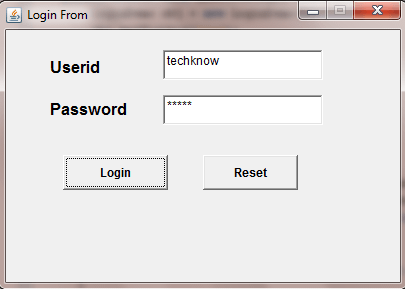
To make Notepad in AWT
Notepad in AWT
NotepadDemo.java
package com.techknow.notepad;

import java.awt.Dimension;
import java.awt.FileDialog;
import java.awt.Frame;
import java.awt.Menu;
import java.awt.MenuBar;
import java.awt.MenuItem;
import java.awt.MenuShortcut;
import java.awt.Rectangle;
import java.awt.SystemColor;
import java.awt.TextArea;
import java.awt.datatransfer.Clipboard;
import java.awt.datatransfer.DataFlavor;
import java.awt.datatransfer.StringSelection;
import java.awt.datatransfer.Transferable;
import java.awt.event.ActionEvent;
import java.awt.event.ActionListener;
import java.awt.event.ComponentAdapter;
import java.awt.event.ComponentEvent;
import java.awt.event.WindowAdapter;
import java.awt.event.WindowEvent;
import java.awt.print.PrinterJob;

import java.io.FileNotFoundException;
import java.io.IOException;

import javax.print.PrintService;

public class NotepadDemo extends Frame
{
	public static TextArea textArea1 = new TextArea();
    private MenuBar menuBar1 = new MenuBar();
    private Menu filemenu = new Menu();
    private MenuItem newItem = new MenuItem("New");
    private MenuItem openItem = new MenuItem("Open...");
    private MenuItem saveItem = new MenuItem("Save");
    private MenuItem printItem = new MenuItem("Print");
    private MenuItem exitItem = new MenuItem("Exit");
    private MenuItem cutItem =
    		new MenuItem("Cut", new MenuShortcut('X',true));
    private MenuItem copyItem = new MenuItem("Copy");
    private MenuItem pasteItem =
    		new MenuItem("Paste",new MenuShortcut('V',true));
    private Menu editMenu = new Menu("Edit");
    Clipboard clipbd = this.getToolkit().getSystemClipboard();

    public NotepadDemo()
    {
        try
        {
            jbInit();
        }
        catch (Exception e)
        {
            e.printStackTrace();
        }
    }

    private void jbInit() throws Exception
    {
        this.setLayout( null );
        this.setSize(new Dimension(400, 328));
        this.setBackground( SystemColor.control );
        this.addComponentListener(new ComponentAdapter() {
                public void componentResized(ComponentEvent e) {
                    this_componentResized(e);
                }
            });
        textArea1.setBounds(new Rectangle(10, 70, 335, 220));
        filemenu.setLabel("File");
        filemenu.add(newItem);
        filemenu.add(openItem);
        filemenu.add(saveItem);
        filemenu.addSeparator();
        filemenu.add(printItem);
        filemenu.add(exitItem);
        menuBar1.add(filemenu);
        menuBar1.add(editMenu);
        editMenu.add(cutItem);
        editMenu.add(copyItem);
        editMenu.addSeparator();
        editMenu.add(pasteItem);
        this.setMenuBar(menuBar1);
		this.addWindowListener(new WindowAdapter() {
                public void windowClosing(WindowEvent e) {
          this_windowClosing(e);
          }
        });
        this.add(textArea1, null);
        newItem.addActionListener(new ActionListener() {
            	public void actionPerformed(ActionEvent ee) {
                	newItem_Click(ee);
                   }
                }
                );


        openItem.addActionListener(new ActionListener() {
                public void actionPerformed(ActionEvent ee) {
                	openItem_Click(ee);
                	}
                }
                );
		saveItem.addActionListener(new ActionListener() {
				public void actionPerformed(ActionEvent ee) {
					saveItem_Click(ee);
					}
                }
                );
        cutItem.addActionListener(new ActionListener() {
                public void actionPerformed(ActionEvent ee) {
                	cutItem_Click(ee);
                	}
                }
                );
        copyItem.addActionListener(new ActionListener() {
                public void actionPerformed(ActionEvent ee) {
                	copyItem_Click(ee);
                	}
                }
                );
        pasteItem.addActionListener(new ActionListener() {
                public void actionPerformed(ActionEvent ee) {
                	pasteItem_Click(ee);
                	}
                }
                );
        printItem.addActionListener(new ActionListener() {
                public void actionPerformed(ActionEvent ee) {
                	printItem_Click(ee);
                	}
                }
                );
		}

		public static void main(String[] args)
		{
	        NotepadDemo obj = new NotepadDemo();
	        obj.setVisible(true);
		}

		private void this_componentResized(ComponentEvent e)
		{
			int height = this.getHeight();
			int width = this.getWidth();
			height = height- 50;
			width = width - 30;

			textArea1.setSize(width,height);
		}

	private void newItem_Click(ActionEvent e)
	{
		String data = textArea1.getText();
		if(data.length()>0)
		{
			NewFrame obj = new NewFrame();
			obj.setVisible(true);
			obj.setLocation(200,200);
		}
	}

	private void openItem_Click(ActionEvent e)
	{
        FileDialog fd =
        		new FileDialog(this,"My Open Dialog",FileDialog.LOAD);
        fd.setVisible(true);
        String dirName = fd.getDirectory();
        String fileName = fd.getFile();
        String path = dirName + fileName;
        ReadWriteDemo rw= new ReadWriteDemo();
        String data = null;
        try {
            data = rw.readData(path);
        }
        catch (FileNotFoundException f)
        {
        }
        catch (IOException f)
        {
        }

        NotepadDemo.textArea1.setText(data);
	}

    private void saveItem_Click(ActionEvent e)
    {
		FileDialog fd =
			new FileDialog(this,"My Save Dialog",FileDialog.SAVE);
		fd.setVisible(true);
		String dirName = fd.getDirectory();
		String fileName = fd.getFile();
		String path = dirName + fileName;
		ReadWriteDemo rw = new ReadWriteDemo();


		try
		{
			rw.writeData(NotepadDemo  .textArea1.getText(),path);
		}
		catch (FileNotFoundException f)
		{
		}
		catch (IOException f)
		{
		}
	}

	private void this_windowClosing(WindowEvent e)
    {
		String data = textArea1.getText();
		if(data.length()>0)
		{
			NewFrame obj = new NewFrame();
			obj.setVisible(true);
			obj.setLocation(200,200);
		}
	}

	private void cutItem_Click(ActionEvent e)
	{
		String selection = textArea1.getSelectedText();
		StringSelection clipString =  new StringSelection(selection);
		clipbd.setContents(clipString, clipString);
        textArea1.replaceRange("",
        	textArea1.getSelectionStart(),textArea1.getSelectionEnd());
    }

    private void copyItem_Click(ActionEvent e)
    {
        String selection = textArea1.getSelectedText();
        StringSelection clipString =  new StringSelection(selection);
        clipbd.setContents(clipString, clipString);
    }

    private void pasteItem_Click(ActionEvent e)
    {
		Transferable clipData =  clipbd.getContents(this);
			try
			{
			  String clipString =(String)clipData.
					getTransferData(DataFlavor.stringFlavor);
					textArea1.replaceRange(clipString,
							textArea1.getSelectionStart(),
							textArea1.getSelectionEnd()
						);
			}
			catch(Exception ex)
			{
				System.out.println("not String flavor");
			}
		}

	private void printItem_Click(ActionEvent e)
	{
		 // PrinterJob Class controls printing to a particular print
		 //service (such as a printer or fax capability).
		PrinterJob printJob = PrinterJob.getPrinterJob();
        PrintService printer = printJob.getPrintService();
        printJob.printDialog();
    }
}
NewFrame.java
package com.techknow.notepad;

import java.awt.Button;
import java.awt.Dimension;
import java.awt.FileDialog;
import java.awt.Font;
import java.awt.Frame;
import java.awt.Label;
import java.awt.Rectangle;
import java.awt.SystemColor;
import java.awt.event.ActionEvent;
import java.awt.event.ActionListener;

import java.io.FileNotFoundException;
import java.io.IOException;

public class NewFrame extends Frame {
    private Label label1 = new Label();
    private Button button1 = new Button();
    private Button button2 = new Button();
    private Button button3 = new Button();

    public NewFrame() {
        try {
            jbInit();
        } catch (Exception e) {
            e.printStackTrace();
        }
    }

    private void jbInit() throws Exception {
        this.setLayout( null );
        this.setSize(new Dimension(315, 217));
        this.setBackground( SystemColor.control );
        this.setResizable(false);
        label1.setText("Do u want to Save or not");
        label1.setBounds(new Rectangle(15, 45, 285, 55));
        label1.setFont(new Font("Tahoma", 1, 18));
        button1.setLabel("Save");
        button1.setBounds(new Rectangle(25, 150, 75, 24));
        button1.addActionListener(new ActionListener() {
                public void actionPerformed(ActionEvent e) {
                    button1_actionPerformed(e);
                }
            });
        button2.setLabel("Don't Save");
        button2.setBounds(new Rectangle(115, 150, 75, 24));
        button2.addActionListener(new ActionListener() {
                public void actionPerformed(ActionEvent e) {
                    button2_actionPerformed(e);
                }
            });
        button3.setLabel("Cancel");
        button3.setBounds(new Rectangle(210, 150, 75, 24));
        button3.addActionListener(new ActionListener() {
                public void actionPerformed(ActionEvent e) {
                    button3_actionPerformed(e);
                }
            });
        this.add(button3, null);
        this.add(button2, null);
        this.add(button1, null);
        this.add(label1, null);
    }

    private void button1_actionPerformed(ActionEvent e) {
        FileDialog fd =
        	new FileDialog(this,"My Save Dialog",FileDialog.SAVE);
        fd.setVisible(true);
        String dirName = fd.getDirectory();
        String fileName = fd.getFile();
        String path = dirName + fileName;
        ReadWriteDemo rw = new ReadWriteDemo();


        try {
            rw.writeData(NotepadDemo  .textArea1.getText(),path);
        } catch (FileNotFoundException f) {
        } catch (IOException f) {
        }
    }

    private void button2_actionPerformed(ActionEvent e) {
       NotepadDemo.textArea1.setText("");
        this.setVisible(false);
    }

    private void button3_actionPerformed(ActionEvent e) {
        this.setVisible(false);
    }
}
ReadWriteDemo.java
package com.techknow.notepad;

import java.io.FileInputStream;
import java.io.FileNotFoundException;
import java.io.FileOutputStream;
import java.io.IOException;

public class ReadWriteDemo {
    public ReadWriteDemo() {
    }

    public String readData(String path ) throws
	    		FileNotFoundException, IOException {
        StringBuffer sb = new StringBuffer();
        path  = path.replace("\\","\\\\");

        FileInputStream fi = new FileInputStream(path);
        int z = fi.read();

        while(z!=-1) {
            sb.append((char)z);
            System.out.print((char)z);
            z = fi.read();
        }
        fi.close();
        return sb.toString();
    }
    public void writeData(String data, String path)
    				throws FileNotFoundException, IOException {

        path = path.replace("\\","\\\\");
        FileOutputStream fo = new FileOutputStream(path);
        fo.write(data.getBytes());
        fo.close();
    }
}
Output