Label
Package :
Class:
Note :A Label displays a single line of read-only text
Java.awt
Class:
java.awt.Label
Note :A Label displays a single line of read-only text
Constructors of Label Class
| Name | Description |
|---|---|
Label() |
This constructor creates instance of a Label. |
Label(String text) |
This constructor creates instance of a Label with the given label of string |
Label(String text, int alignment) |
This constructor creates instance of a Label with the given label of string and also sets the alignment |
Methods of Label Class
| Method | Description |
|---|---|
getAlignment() |
This method gets the text alignment of Label. |
getText() |
This method gets the Text of Label. |
setAlignment(int alignment) |
This method sets the Text alignment of label. |
setText(String text) |
This method sets the Text on the Label. |
Example :
package com.techknow.lebel;

import java.awt.Button;
import java.awt.Dimension;
import java.awt.Font;
import java.awt.Frame;
import java.awt.Label;
import java.awt.Rectangle;
import java.awt.SystemColor;
import java.awt.event.ActionEvent;
import java.awt.event.ActionListener;

public class LabelDemo extends Frame
{
	private Label label1 = new Label();
	private Label label2 = new Label();
	private Button button1 = new Button();
	private Button button2 = new Button();
	private Button button3 = new Button();

	public LabelDemo()
	{
		try
		{
			jbInit();
		}
		catch (Exception e)
		{
			e.printStackTrace();
		}
	}
	private void jbInit() throws Exception
	{
		this.setLayout( null );
		this.setSize(new Dimension(451, 300));
		this.setBackground( SystemColor.control );
		label1.setText("Label for Demonstration");
		label1.setBounds(new Rectangle
			(25, 45, 380, 35));
		label1.setFont(new Font("Tahoma", 1, 14));
		label1.setBackground(new java.awt.Color
			(247, 255, 214));
		label1.setForeground(java.awt.Color.red);
		label2.setText("Set the alignment of Label");
		label2.setBounds(new Rectangle
			(65, 135, 280, 15));
		label2.setFont(new Font("Tahoma", 1, 12));
		button1.setLabel("Left");
		button1.setBounds(new Rectangle
			(60, 170, 70, 25));
		button1.setFont(new Font("Tahoma", 1, 12));
		button1.addActionListener(new ActionListener()
		{
			public void actionPerformed(ActionEvent e)
			{
				button1_actionPerformed(e);
			}
		});
		button2.setLabel("Center");
		button2.setBounds(new Rectangle
			(150, 170, 80, 25));
		button2.setFont(new Font("Tahoma", 1, 12));
		button2.addActionListener(new ActionListener()
		{
			public void actionPerformed(ActionEvent e)
			{
				button2_actionPerformed(e);
			}
		});
		button3.setLabel("Right");
		button3.setBounds(new Rectangle
			(255, 170, 70, 25));
		button3.setFont(new Font("Tahoma", 1, 12));
		button3.addActionListener
			(new ActionListener()
		{
			public void actionPerformed
				(ActionEvent e)
			{
				button3_actionPerformed(e);
			}
		});
		this.add(button3, null);
		this.add(button2, null);
		this.add(button1, null);
		this.add(label2, null);
		this.add(label1, null);
	}
	private void button1_actionPerformed(ActionEvent e)
	{
		label1.setAlignment(0);
	}
	private void button2_actionPerformed(ActionEvent e)
	{
		label1.setAlignment(1);
	}
	private void button3_actionPerformed(ActionEvent e)
	{
		label1.setAlignment(2);
	}
	public static void main(String args[])
	{
		LabelDemo obj=new LabelDemo();
		obj.setVisible(true);
		obj.setLocation(150,150);
	}
}
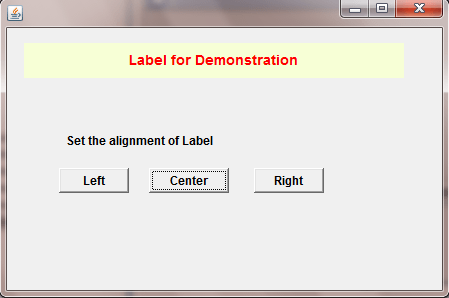
Output :
Textfield
Package :
Class:
Note :A Textfield used for taking input from user.
Java.awt
Class:
java.awt.Textfield
Note :A Textfield used for taking input from user.
Constructors of Textfield Class
| Name | Description |
|---|---|
TextField() |
This constructor creates instance of a Textfield. |
TextField(int columns) |
This constructor creates instance of a Textfield with the given number of Columns |
TextField(String text) |
This constructor creates instance of a Textfield with the given text. |
TextField(String text, int columns) |
This constructor creates instance of a Textfield with the given text and number of columns. |
Methods of Textfield Class
| Method | Description |
|---|---|
echoCharIsSet() |
This method check the Textfield has character for echoing. |
addActionListener(ActionListener l) |
This method sets the actionListener on the Textfield. |
getActionListeners() |
This method gets the actionListener from Textfield. |
getColumns() |
This method gets the columns from Textfield. |
getEchoChar() |
This method gets the echoChar from Textfield. |
removeActionListener(ActionListener l) |
This method sets the actionListener on Textfield. |
setColumns(int columns) |
This method sets the columns on Textfield. |
setEchoChar(char c) |
This method sets the echoChar on Textfield. |
setEchoCharacter(char c) |
This method is the replacement of setEchoChar(char c) |
setText(String t) |
This method sets Text of Textfield. |
Example :
package com.techknow.textfields;

import java.awt.Button;
import java.awt.Dimension;
import java.awt.Font;
import java.awt.Frame;
import java.awt.Label;
import java.awt.Rectangle;
import java.awt.SystemColor;
import java.awt.TextField;
import java.awt.event.ActionEvent;
import java.awt.event.ActionListener;

public class TextfieldDemo extends Frame
{
	private TextField textField1 = new TextField();
	private Button button1 = new Button();
	private Label label1 = new Label();
	private Label label2 = new Label();

	public TextfieldDemo()
	{
		try
		{
			jbInit();
		}
		catch (Exception e)
		{
			e.printStackTrace();
		}
	}
	private void jbInit() throws Exception
	{
		this.setLayout( null );
		this.setSize( new Dimension( 400, 300 ) );
		this.setBackground( SystemColor.control );
		textField1.setBounds(new Rectangle
			(115, 60, 240, 20));
		textField1.setEchoChar('*');
		button1.setLabel("Get Text Of Textfield");
		button1.setBounds(new Rectangle
			(55, 95, 205, 40));
		button1.setFont(new Font("Tahoma", 1, 14));
		button1.addActionListener
			(new ActionListener()
		{
			public void actionPerformed
				(ActionEvent e)
			{
				button1_actionPerformed(e);
			}
		});
		label1.setBounds(new Rectangle
			(40, 155, 245, 45));
		label1.setFont(new Font("Tahoma", 1, 12));
		label1.setAlignment(1);
		label1.setBackground(new java.awt.Color
			(255, 247, 214));
		label1.setForeground(java.awt.Color.red);
		label2.setText("Enter Text");
		label2.setBounds(new Rectangle
			(25, 65, 75, 15));
		label2.setFont(new Font
			("Tahoma", 1, 12));
		this.add(label2, null);
		this.add(label1, null);
		this.add(button1, null);
		this.add(textField1, null);
	}
	public static void main(String args[])
	{
		TextfieldDemo obj=new TextfieldDemo();
		obj.setVisible(true);
		obj.setLocation(150,150);
	}
	private void button1_actionPerformed
		(ActionEvent e)
	{
		String str=textField1.getText();
		label1.setText(str);
	}
}
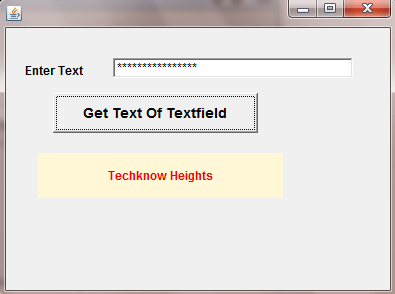
Output :
TextArea
Package :
Class:
Note :A TextArea used for taking input from user.TextArea have multiple line region to get input from user.

Java.awt
Class:
java.awt.TextArea
Note :A TextArea used for taking input from user.TextArea have multiple line region to get input from user.
Constructors of TextArea Class
| Name | Description |
|---|---|
TextArea() |
This constructor creates instance of a TextArea. |
TextArea(int rows, int columns) |
This constructor creates instance of a Textarea with the given number of Columns and row. |
TextArea(String text) |
Constructs a new text area with the specified text. |
TextArea(String text, int rows, int columns) |
Constructs a new text area with the specified text and also row and column. |
TextArea(String text, int rows, int columns, int scrollbars) |
Constructs a new text area with the specified text,row and column and scrollbar. |
Methods of TextArea Class
| Method | Description |
|---|---|
append(String str) |
This method update the text in TextArea. |
appendText(String str) |
This method is replacement of append(String str). |
getColumns() |
This method gets the column count of TextArea. |
getRows() |
This method gets the rows from Textfield. |
insert(String str, int pos) |
This method insert the Text in TextArea at the specified position. |
replaceRange(String str, int start, int end) |
This method replace the String from start index to end index. |
replaceText(String str, int start, int end) |
This method replace the String from start index to end index. |
setColumns(int columns) |
This method sets the columns of Textarea. |
setRows(int rows) |
This method sets the rows of Textarea. |
Example :
package com.techknow.textarea;

import java.awt.Dimension;
import java.awt.Font;
import java.awt.Frame;
import java.awt.Rectangle;
import java.awt.SystemColor;
import java.awt.TextArea;

public class TextAreaDemo extends Frame
{
	private TextArea textArea1 = new TextArea();
	public TextAreaDemo()
	{
		try
		{
			jbInit();
		}
		catch (Exception e)
		{
			e.printStackTrace();
		}
	}
	private void jbInit() throws Exception
	{
		this.setLayout( null );
		this.setSize(new Dimension(412, 319));
		this.setBackground( SystemColor.control );
		this.setTitle("Text Area Demo");
		this.setFont(new Font("Dialog", 1, 12));
		textArea1.setBounds(new Rectangle
			(5, 25, 395, 275));
		this.add(textArea1, null);
	}
	public static void main(String args[])
	{
		TextAreaDemo obj=new TextAreaDemo();
		obj.setVisible(true);
		obj.setLocation(150,150);
	}
}
Output :
Button
Package :
Class:
Note : Button class use to perform action when the Button is clicked. Button has Text as well as an image.
Java.awt
Class:
java.awt.Button
Note : Button class use to perform action when the Button is clicked. Button has Text as well as an image.
Constructors of Button Class
| Name | Description |
|---|---|
Button() |
This constructor creates instance of a Button. |
Button(String Text) |
This constructor creates instance of a Button with the specified text. |
Methods of Button Class
| Method | Description |
|---|---|
setLabel(String label) |
This method sets the label at Button. |
setActionCommand(String command) |
This method perform a specific task which is set by this method. |
removeActionListener(ActionListener l) |
This method erase the Action from the Button. |
getLabel() |
This method gets the label from Button. |
getActionListeners() |
This method gets the actionListener from the Button. |
getActionCommand() |
This method gets the action command which set on the Button. |
addActionListener(ActionListener l) |
This method sets the actionListener on the Button. |
addNotify() |
This method creates the peer of Button. |
Example :
package com.techknow.buttonDemo;

import java.awt.Button;
import java.awt.Dimension;
import java.awt.Font;
import java.awt.Frame;
import java.awt.Rectangle;
import java.awt.SystemColor;
import java.awt.event.ActionEvent;
import java.awt.event.ActionListener;

public class ButtonDemo extends Frame
{
	private Button button1 = new Button();
	private Button button2 = new Button();
	public ButtonDemo()
	{
		try
		{
			jbInit();
		} catch (Exception e)
		{
			e.printStackTrace();
		}
	}
	private void jbInit() throws Exception
	{
		this.setLayout( null );
		this.setSize(new Dimension(247, 114));
		this.setBackground( SystemColor.control );
		this.setResizable(false);
		button1.setLabel("Show");
		button1.setBounds
			(new Rectangle(25, 50, 80, 30));
		button1.setFont(new Font("Tahoma", 1, 14));
		button1.addActionListener(new ActionListener()
		{
			public void actionPerformed(ActionEvent e)
			{
				button1_actionPerformed(e);
			}
		});
		button2.setLabel("Hide");
		button2.setBounds(new Rectangle
			(120, 50, 85, 30));
		button2.setFont(new Font("Tahoma", 1, 14));
		button2.addActionListener(new ActionListener()
		{
			public void actionPerformed(ActionEvent e)
			{
				button2_actionPerformed(e);
			}
		});
		this.add(button2, null);
		this.add(button1, null);
	}
	public static void main(String args[])
	{
		ButtonDemo obj=new ButtonDemo();
		obj.setSize(220,102);
		obj.setLocation(150,150);
		obj.setVisible(true);
	}
	private void button1_actionPerformed(ActionEvent e)
	{
		button1.setLabel("Hide");
		button2.setLabel("Show");
	}
	private void button2_actionPerformed(ActionEvent e)
	{
		button2.setLabel("Hide");
		button1.setLabel("Show");
	}
}
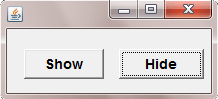
Output :