Package :
Java.awt
Class:
java.awt.Canvas
Note : A Canvas component represents a
blank rectangular area of the screen onto which the application can
draw or from which the application can trap input events from the
user.
Constructors of Canvas Class
| Name |
Description |
Canvas() |
This constructor creates instance of a Canvas. |
Canvas(GraphicsConfiguration config) |
This constructor creates instance of a Canvas with the
given object of GraphicsConfiguration. |
Methods of Canvas Class
| Method |
Description |
getAccessibleContext() |
This method gets the accessible context of Canvas. |
getBufferStrategy() |
This method gets the Buffer Strategy. |
paint(Graphics g) |
This method paint the Canvas |
update(Graphics g) |
update the Canvas. |
createBufferStrategy(int numBuffers) |
This method creates the BufferStrategy. |
Example :
package com.techknow.canvas;

import java.awt.Canvas;
import java.awt.Graphics;
import java.awt.PrintJob;
import java.awt.Toolkit;
import java.util.Properties;
import java.awt.Dimension;
import java.awt.Frame;
import java.awt.SystemColor;

public class CanvasDemo extends Frame
{
	MyCanvas canvas = new MyCanvas();
	public CanvasDemo()
	{
		add("Center", canvas);
		setSize(500, 500);
		setVisible(true);
		String name = "Test print job";
		Properties properties = new Properties();
		PrintJob pj = Toolkit.getDefaultToolkit()
			.getPrintJob(CanvasDemo.this,
		name, properties);
		if (pj != null)
		{
			canvas.printAll(pj.getGraphics());
			pj.end();
		}
	}
	private void jbInit() throws Exception
	{
		this.setLayout( null );
		this.setSize(new Dimension(390, 217));
		this.setBackground( SystemColor.control );
	}
	public static void main(String args[])
	{
		CanvasDemo app = new CanvasDemo();
	}
}

class MyCanvas extends Canvas
{
	public void paint(Graphics g)
	{
		Dimension size = getSize();
		int width = size.width;
		int height = size.height;
		int x1 = (int) (width * 0.1);
		int x2 = (int) (width * 0.9);
		int y1 = (int) (height * 0.1);
		int y2 = (int) (height * 0.9);
		g.drawRect(x1, y1, x2 - x1, y2 - y1);
		g.drawOval(x1, y1, x2 - x1, y2 - y1);
		g.drawLine(x1, y1, x2, y2);
		g.drawLine(x2, y1, x1, y2);
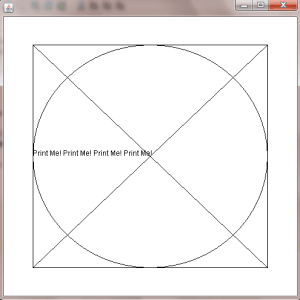
		String text = "Print Me! ";
		text += text;
		text += text;
		g.drawString(text, x1, (int) ((y1 + y2) / 2));
		g.dispose();
	}
}
Output :
Package :
Java.awt
Class:
java.awt.Menu
Note :A Menu object is a drop-down menu
component that is deployed from a menu bar.
Constructors of Menu Class
| Name |
Description |
Menu() |
This constructor creates instance of a Menu. |
Menu(String text) |
This constructor creates instance of a Menu with the
given label of string |
Menu(String text, boolean tearOff) |
This constructor creates instance of a Label with the
given label of string and also check menu is turn off. |
Methods of Menu Class
| Method |
Description |
add(MenuItem mi) |
This method add menu item in Menu. |
add(String label) |
This method add string at menu. |
addSeparator() |
This method add separator between menu items. |
getItem(int index) |
This method gets the item from the given index. |
getItemCount() |
This method gets the number of item inside the menu. |
insert(MenuItem menu item, int index) |
This method inserts menu item inside menu. |
insertSeparator(int index) |
This method inserts separator between menu item. |
remove(MenuComponent item) |
This method remove menu item from menu. |
remove(int index) |
This method remove menu item from menu as per the index. |
removeAll() |
This method remove all menu item from menu. |
Example :
package com.techknow.menu;

import java.awt.Dimension;
import java.awt.Frame;
import java.awt.Menu;
import java.awt.MenuBar;
import java.awt.MenuItem;
import java.awt.SystemColor;
import java.awt.event.ActionEvent;
import java.awt.event.ActionListener;
import javax.swing.JOptionPane;

public class MenuDemo extends Frame
{
	private MenuBar menuBar1 = new MenuBar();
	private Menu menu1 = new Menu("File");
	private Menu menu2 = new Menu("Help");
	private MenuItem hello=new MenuItem("Hello");
	private MenuItem bye=new MenuItem("Bye");
	private MenuItem aboutus=new MenuItem("About Us");
	public MenuDemo()
	{
		try
		{
			jbInit();
		}
		catch (Exception e)
		{
			e.printStackTrace();
		}
	}
	private void jbInit() throws Exception
	{
		this.setLayout( null );
		this.setSize( new Dimension( 400, 300 ) );
		this.setBackground( SystemColor.control );
		this.setVisible(true);
		this.setLocation(150,150);
		this.setMenuBar(menuBar1);
		menu1.setLabel("File");
		hello.addActionListener(new ActionListener()
		{
			public void actionPerformed(ActionEvent e)
			{
				hello_actionPerformed(e);
			}
		});
		bye.addActionListener(new ActionListener()
		{
			public void actionPerformed(ActionEvent e)
			{
				bye_actionPerformed(e);
			}
		});
		aboutus.addActionListener(new ActionListener()
		{
			public void actionPerformed(ActionEvent e)
			{
				aboutus_actionPerformed(e);
			}
		});
		menu1.add(hello);
		menu1.add(bye);
		menu2.add(aboutus);
		menuBar1.add(menu1);menuBar1.add(menu2);
	}
	public static void main(String args[])
	{
		MenuDemo obj=new MenuDemo();
	}
	private void hello_actionPerformed(ActionEvent e)
	{
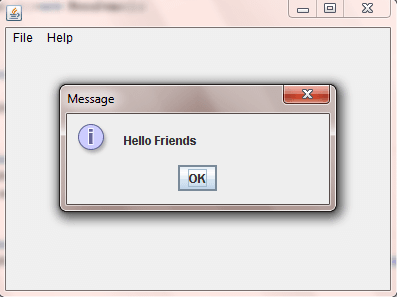
		JOptionPane.showMessageDialog
			(this,"Hello Friends" );
	}
	private void bye_actionPerformed(ActionEvent e)
	{
		JOptionPane.showMessageDialog
			(this,"Bye Friends" );
		System.exit(0);
	}
	private void aboutus_actionPerformed(ActionEvent e)
	{
		JOptionPane.showMessageDialog
		(this,"Hey Friends this is the
		Techknow Heights Examples" );
	}
}
Output :
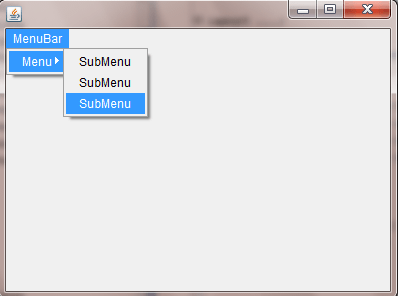
- SubMenu provides easy way of displaying menu items based on
SubMenuModel.
- Each item in a menu must belong to the MenuItem class. It
can be an instance of MenuItem, a submenu (an instance of Menu), or
a check box (an instance of CheckboxMenuItem).
- In AWT creating a SubMenu is easy, you just add menu item
to another menu item.
Example :
package com.techknow.menu;

import java.awt.Dimension;
import java.awt.Frame;
import java.awt.Menu;
import java.awt.MenuBar;
import java.awt.MenuItem;
import java.awt.SystemColor;

public class SubMenuDemo extends Frame
{
	private MenuBar menuBar1 = new MenuBar();
	private Menu menu1 = new Menu("MenuBar");
	private Menu menu2 = new Menu("Menu");
	private MenuItem menu3 = new MenuItem("SubMenu");
	private MenuItem menu4 = new MenuItem("SubMenu");
	private MenuItem menu5 = new MenuItem("SubMenu");
	public SubMenuDemo()
	{
		try
		{
			jbInit();
		}
		catch (Exception e)
		{
			e.printStackTrace();
		}
	}
	private void jbInit() throws Exception
	{
		this.setLayout( null );
		this.setSize( new Dimension( 400, 300 ) );
		this.setBackground( SystemColor.control );
		this.setLocation(150,150);
		this.setVisible(true);
		this.setMenuBar(menuBar1);
		menuBar1.add(menu1);
		menu1.add(menu2);
		menu2.add(menu3);
		menu2.add(menu4);
		menu2.add(menu5);
	}
	public static void main(String args[])
	{
		SubMenuDemo obj=new SubMenuDemo();
	}
}
Output :
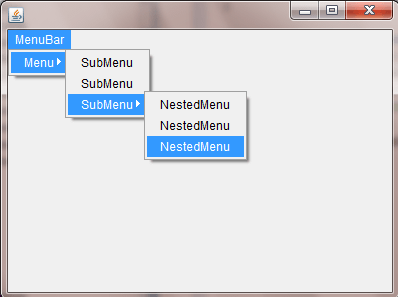
- NestedMenu provides easy way of displaying menu items based
on NestedMenuModel.
- Each menu in a menu must belong to the Menu class.and
futher the nested menu must be belong to the menuItem class .It can
be an instance of MenuItem, a Nestedmenu (an instance of Menu), or
a check box (an instance of CheckboxMenuItem).
- In AWT creating a NestedMenu is easy, you just add menu
item to another menu item.
Example :
package com.techknow.menu;

import java.awt.Dimension;
import java.awt.Frame;
import java.awt.Menu;
import java.awt.MenuBar;
import java.awt.MenuItem;
import java.awt.SystemColor;

public class NestedMenuDemo extends Frame
{
	private MenuBar menuBar1 = new MenuBar();
	private Menu menu1 = new Menu("MenuBar");
	private Menu menu2 = new Menu("Menu");
	private MenuItem menu3 = new MenuItem("SubMenu");
	private MenuItem menu4 = new MenuItem("SubMenu");
	private Menu menu5 = new Menu("SubMenu");
	private MenuItem menu6 = new MenuItem("NestedMenu");
	private MenuItem menu7 = new MenuItem("NestedMenu");
	private MenuItem menu8 = new MenuItem("NestedMenu");
	public NestedMenuDemo()
	{
		try
		{
	    	jbInit();
	    }
	    catch (Exception e)
	    {
	    	e.printStackTrace();
	    }
	}
	private void jbInit() throws Exception
	{
		this.setLayout( null );
		this.setSize( new Dimension( 400, 300 ) );
		this.setBackground( SystemColor.control );
		this.setLocation(150,150);
		this.setVisible(true);
		this.setMenuBar(menuBar1);
		menuBar1.add(menu1);
		menu1.add(menu2);
		menu2.add(menu3);
		menu2.add(menu4);
		menu2.add(menu5);
		menu5.add(menu6);
		menu5.add(menu7);
		menu5.add(menu8);
	}
	public static void main(String args[])
	{
		NestedMenuDemo obj=new NestedMenuDemo();
	}
}
Output :