
Exception Handling in Struts
- The Struts 2 framework provides the functionality of exception handling through the Interceptor.
- Instead of displaying stack trace for the exception to the user, it is always good to show a nicely designed page describing the real problem to the user.
Entry in LoginAction class file
Entry in Struts.xml file
Entry in Exception.jsp file
- This framework provides the flexibility to create own interceptor classes to enable additional logic which can be separated and refused in the Interceptor stack of different action classes.
- The Custom interceptor class need to be defined in the struts.xml file.
Entry in Struts.xml file
Validation Framework
- Struts 2 based on a validation framework, which is provided by Xwork.
- The Validation framework uses external metadata in the form of XML files to describe what validation should be performed on your action.
- Struts2 Validation Framework allows us to separate the validation logic from actual Java/JSP code, where it can be reviewed and easily modified later.
- Validation can be perform
- Programmatic
- XML Meta Data
1. Validation Using XML Meta-Data
Entry in AddEmployee.jsp file
Entry in AddEmployeeAction class file
Entry in AddEmployeeActionValidation.xml class file
Entry in AddEmployeeAction class file
Entry in AddEmployeeActionValidation.xml class file
Note
: validation.xml file placed in the same location , where Action is
placed and it is same name as action name and end with
validation.xml file
2. Validation Using Programmatic
- It is written in the Actionclass by overriding the validate
method , this method calls automatically when user submit the page,
it is call before the execute method , and if any error occurred ,
it return the
inputas a result , otherwise it execute the execute method of the action
Entry in LoginAction.jsp file
Internationalization is a technique for application development that support multiple languages and data formats without having to rewrite programming logic.
Make different Language property files
DE Language property files
FR Language property files
Entry in Struts property files
Entry in Login.jsp files
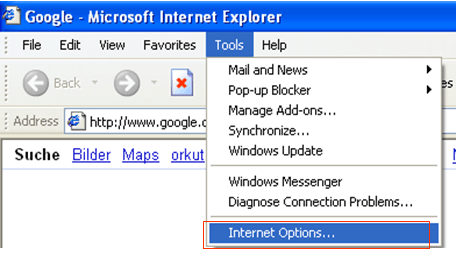
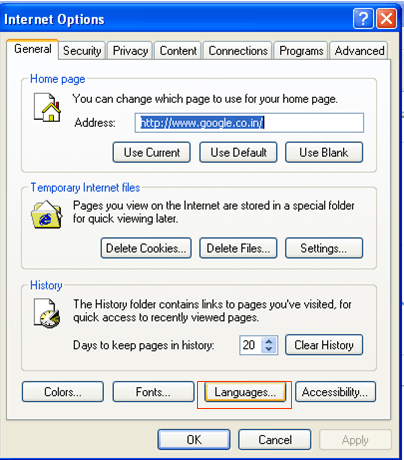
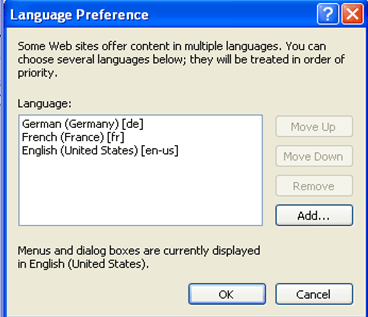
Steps to configure Language
Control Tags<s:if><s:iterator>
Entry in LoginAction class fileEntry in Welcome.jsp files
Note : Also Specify the application resource name and path in
struts.properties file, the path is required if you are not placed in
application resoource file in the src folder


