

Introduction To Perf4j
Perf4J is used for calculating and displaying performance statistics for Java application. Perf4j is a set of utilities useful for developers those who are familiar with logging frameworks such as log4j, logback, JCL and JUL.
Features of Perf4j
- A simple stop watch mechanism for succinct timing statements.
- It is easy to integrate with common popular logging framework such as log4j, logback, JCl and Slf4j(facade) as well.
- It generate aggregated statistics and performance graphs for any log file parse through command line.
- Custom logging framework(log4j and logback appenders) to generate statistics and graphs in a running application.
- Support servlet for exposing statistics and performance graphs for web application.
- It send notification when statistics cross the specified limit.
- An extensible architecture
Perf4j with SLF4J and Log4j
TO use Perf4j with SLF4J and Log4j we need to follow severals steps given below
- Step-1 Download Per4j, SLF4J and Log4j jar files. click here for Perf4j jar , click here for Slf4j jar and click her for Log4j jar.
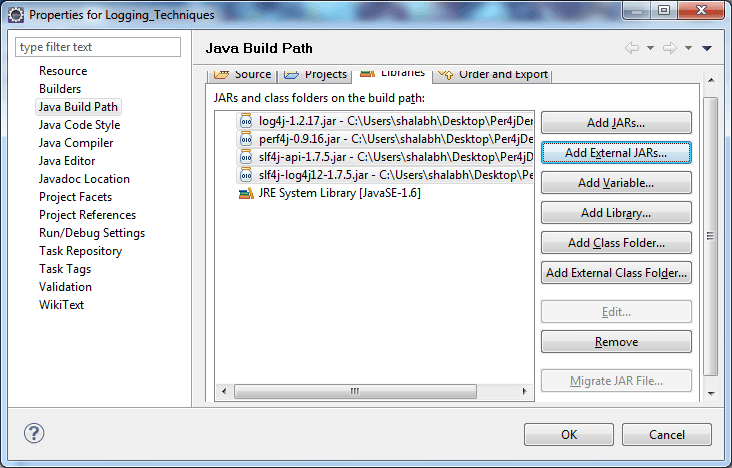
- Step-2 Add perf4j-0.9.16.jar, slf4j-api-1.7.5.jar, slf4j-log4j12-1.7.5.jar and log4j-1.2.17.jar into classpath by rightclick on project >> properties >> java buildpath >> add external jars >> browse for perf4j-0.9.16.jar, slf4j-api-1.7.5.jar, slf4j-log4j12-1.7.5.jar and log4j-1.2.17.jar >> click OK.
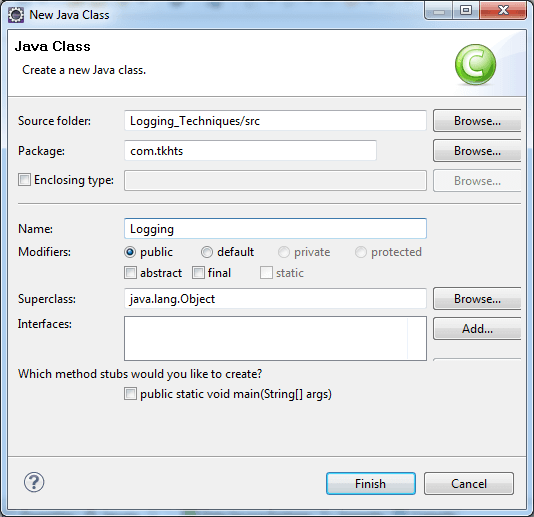
- Step-3 Create java class by right-click on project >> New >> class >> class name >> finish.
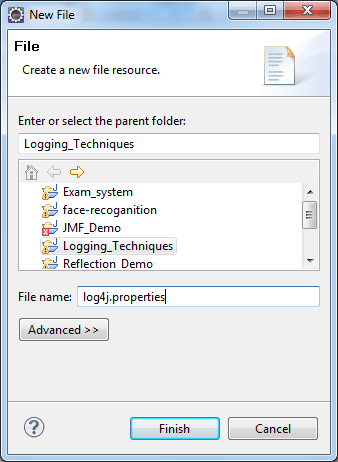
- Step-4 Create log4j.properties file by right-click on project >> New >> file.
Perf4j with SLF4J and Log4j Example
Perf4jTestDemo.java
import org.perf4j.StopWatch;
import org.perf4j.log4j.Log4JStopWatch;
import org.slf4j.Logger;
import org.slf4j.LoggerFactory;

public class Perf4jTestDemo
{

	Logger logger =
		LoggerFactory.getLogger(Perf4jTestDemo.class);
	void calculation()
	{
		StopWatch watch = new Log4JStopWatch();
		logger.debug("Calculation method code
			starts"+watch.getStartTime());
		int a = 100;
		int b = 20;
		int c = 30;
		int d = 0;
		int e = a *b + c-d;
		for(int i = 1; i<=10000; i++)
		{
			e = a *b + c-d;
		}
		System.out.println("Now Result is "+e);

		logger.debug("Calculation method ends
			"+watch.getElapsedTime());
	}
	public static void main(String[] args)
	{
		Perf4jTestDemo obj = new Perf4jTestDemo();
		obj.calculation();

	}
}
log4j.properties
log4j.rootLogger=ALL,console

log4j.appender.console =
	org.apache.log4j.ConsoleAppender
log4j.appender.console.layout =
	org.apache.log4j.PatternLayout
log4j.appender.console.layout.ConversionPattern =
	%d %p %t %c - %m%n

# Output to stdout
#log4j.rootLogger=INFO, stdout


#output to file
#log4j.rootLogger=DEBUG, file

#output to stdout, file
#log4j.rootLogger=INFO, file, stdout

# Direct log messages to stdout
#log4j.appender.stdout=
	org.apache.log4j.ConsoleAppender
#log4j.appender.stdout.Target=System.out
#log4j.appender.stdout.layout=
	org.apache.log4j.PatternLayout
#log4j.appender.stdout.layout.ConversionPattern=
	%d{yyyy-MM-dd HH:mm:ss} %-5p %c{1}:%L - %m%n

# Direct log messages to a log file
#log4j.appender.file=org.apache.log4j.RollingFileAppender
#log4j.appender.file.File=
	e:\\tkhts\\log\\loging.log
#log4j.appender.file.MaxFileSize=1MB
#log4j.appender.file.MaxBackupIndex=1
#log4j.appender.file.layout=org.apache.log4j.PatternLayout
#log4j.appender.file.layout.ConversionPattern=
	%d{yyyy-MM-dd HH:mm:ss} %-5p %c{1}:%L - %m%n
Output
2013-05-29 16:01:06,630 INFO main Perf4jTestDemo - Entering application.
2013-05-29 16:01:06,632 DEBUG main Perf4jTestDemo - Calculation method code starts 1369823466632
Now Result is 2030
2013-05-29 16:01:06,632 DEBUG main Perf4jTestDemo - Calculation method ends 0
2013-05-29 16:01:06,633 INFO main Perf4jTestDemo - Exiting application.


