Difference between String and String Buffer
| String | String Buffer |
|---|---|
| String is a data type and class in java | String Buffer is a class in java |
| String is Immutable | String Buffer is Mutuable |
| String comes under character datatype | String Buffer comes under reference data type |
| In concatenation operation String is slower |
In concatenation operation String Buffer is faster |
Difference between StringBuilder and StringBuffer in Java
StringBuffer
is very good with mutable String but it has one disadvantage all its
public methods are synchronized which makes it
thread-safe
but same time slow. In JDK 5 they provided similar class called
StringBuilder
in Java which is a copy of
StringBuffer
but without
synchronization.
Try to use
StringBuilder
whenever possible it performs better in most of cases than
StringBuffer
class. You can also use "+" for concatenating two string because "+"
operation is internal implemented using either
StringBuffer
or
StringBuilder
in Java. If you see
StringBuilder
vs
StringBuffer
you will find that they are exactly similar and all API methods
applicable to
StringBuffer
are also applicable to
StringBuilder
in Java. On the other hand
String
vs
StringBuffer
is completely different and there API is also completely different
Performance Measures between String , StringBuffer, StringBuilder
public class builder {
    public static void main(String[] args) {
        int N = 100000;
        long t;

        {
        	 String sb1 = new String("hello");
             t = System.currentTimeMillis();
             for (int i = N; i --> 0 ;) {
                 sb1.concat("hi");
             }
             System.out.println("time take by String :" +(System.currentTimeMillis() - t));


            StringBuffer sb = new StringBuffer("hello");
            t = System.currentTimeMillis();
            for (int i = N; i --> 0 ;) {
                sb.append("hi");
            }
            System.out.println("time take by StringBuffer :" +(System.currentTimeMillis() - t));
        }

        {
            StringBuilder sb = new StringBuilder("hello");
            t = System.currentTimeMillis();
            for (int i = N; i --> 0 ;) {
                sb.append("hi");
            }
            System.out.println("time take by StringBuilder :" +(System.currentTimeMillis() - t));
        }
    }
}
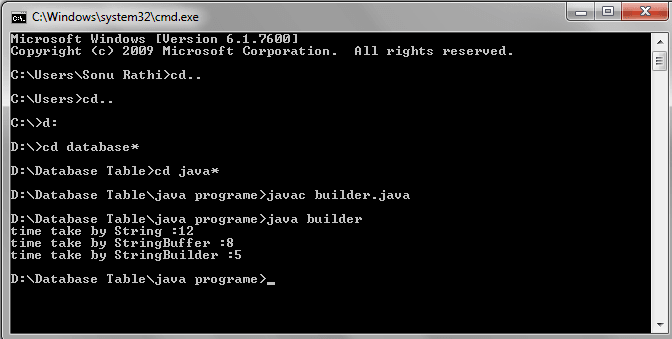
When we concate a string "hi" in String object, StringBuffer Object and StringBuilder object then time taken is:
OUTPUT: