

String Introduction
String Class
- String is a class in java that is final
- String in Java programming, are a sequence of characters. In the Java programming language, strings are objects.
- String is also a data type in java
- All string literals in Java programs, such as "abc", are implemented as instances of this class.
- Strings are constant; their values cannot be changed after they are created
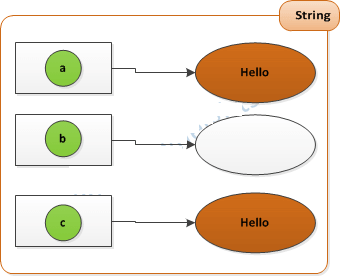
Example of String
String a="Hello";
String b=new String();
String c=new String("Hello");
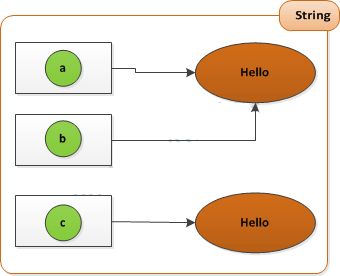
Another Example of String
String a="Hello";
String b="Hello";
String c=new String("Hello");
if(a==b)
System.out.println("Same reference");

if(a==c)
System.out.println("Same Reference of A and C");
else
System.out.println("Not Same Reference");
String Methods
- concat(String a):Concate one string content into another string. Example:
- toLowerCase():Convert String into small case. Example:
- charAt(int index):Returns the character located at the specified index. Example:
- equalsIgnoreCase(String a):Determines the equality of two strings, ignoring case. Example:
- split():J2SE 1.4 added the split() method to the String class to simplify the task of breaking a string into substrings, or tokens. Example:
	String a="Hello";
	System.out.println(a.concat("Bye");  //Output is HelloBye
	System.out.println(a);  //Output is Hello
String a="Hello";
	a=a.toLowerCase();  // a value is hello
String a="Hello";
	System.out.println(a.charAt(1));  //output is e
String a="Hello";
	String b="HELLO";
	if(a.equalsIgnoreCase(b))
		System.out.println("Equals");
	else
	System.out.println("Not Equals");
String a="This is a String Object";
String x[]=a.split(" ");
for(i=0;i<x.length;i++){
System.out.println(x[i]);
}
}


