

StringBuffer
java.lang.StringBuffer classes should be used when you have to make a lot of modifications to strings of characters. As we discussed in the previous section, String objects are immutable , so if you choose to do a lot of manipulations with String Objects, you will end up with a lot of abandoned String objects in the String pool.
Example:
	StringBuffer sb=new StringBuffer("Hello");
	sb.append("Java");
	System.out.println(sb);  //HelloJava
Note:In Jdk1.5 a new class is added StringBuilder, this class has same method as StringBuffer. The only difference between StringBuilder and StringBuffer is, StringBuffer is synchronized and StringBuilder is not synchrnoized,, and it is faster than StringBuffer.
StringBuffer methods
- append(String s):To append value on end , it can take boolean, float, int etc. Example:
- delete(int start,int end):A substring is removed from the original object Example:
- insert(int offset,String s):To add value on desired location, and you can add any kind of value. Example:
- reverse():To reverse an original String. Example:
- deleteCharAt(int index):Delete a character from given index.
	StringBuffer s=new StringBuffer("Hello");
	s.append(true);  //Output is Hellotrue
	StringBuffer s=new StringBuffer("Hello");
	s.delete(2,4);  //Heo
	StringBuffer s=new StringBuffer("1234567");
	s.insert(4,"----");  //1234---567
	StringBuff	er s=new StringBuffer("Hello");
	s.reverse();   //olleH
StringBuffer s=new StringBuffer("Hello");
s.deleteCharAt(2); //Helo
String Buffer Class ( Since JDK 1.0)
- JDK provides two classes to support
mutable strings:StringBufferandStringBuilder(in core package java.lang) . - A StringBuffer or StringBuilder object is just like any
ordinary object, which are stored in the
heap. - It can be
modifiedwithout causing adverse side-effect to other objects. - In java we
can'tcreate StringBuffer Literals.
Example:
class Test{
   public static void main(String args[]){
     /* initialization of StringBuffer Object */
     StringBuffersb=new StringBuffer("StringBuffer");
     System.out.println("After Initialization "+sb);
    /* Modify the value of StringBuffer Object */
    sb.append("Object");
    System.out.println("After Updation "+sb);
   }
}
OUTPUT
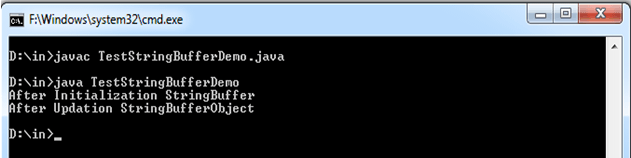
Memory Layout of String Buffer Object:
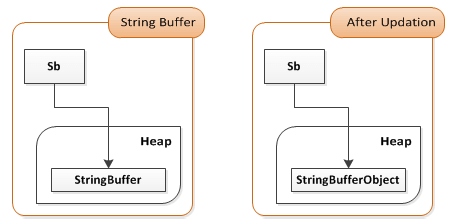
Some important notes:
- Create strings as
literalsinstead of creating String objects using'new'key word whenever possible - Use
String.intern()method if you want to add number of equal objects whenever you create String objects using'new'key word. + operatorgives best performance for String concatenation if Strings resolve at compile time- StringBuffer with proper
initial sizegives best performance for String concatenation if Strings resolve at run time.


