

Memory Layouts in JVM
JVM is software that is platform specific.
For example: Linux platform
You require a Linux based JVM, for windows platform you require a windows based JVM. Now in these days JVM is bundled with Internet explorer and With other types of browsers. JVM is a platform-independent execution environment that converts Java byte code into machine language and executes.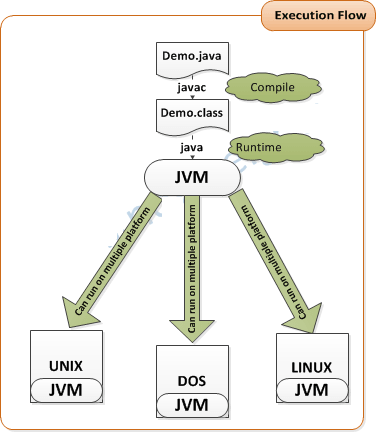
JRE=JVM (Java Virtual machine)+ jar files (libraries)
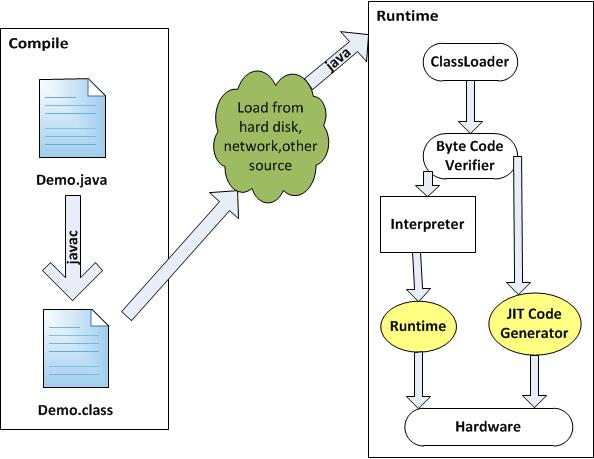
For example: Linux platform
You require a Linux based JVM, for windows platform you require a windows based JVM. Now in these days JVM is bundled with Internet explorer and With other types of browsers. JVM is a platform-independent execution environment that converts Java byte code into machine language and executes.
Figure: Java Program Execution Flow
A JVM performs the following
tasks:
JDK(Java Development Kit)
JDK: JDK
is a software package which is used to develop and deploy java
applications.
JDK=
javac compiler + .jar (libraries) + javadoc + jdb + JRE : JDK consists:
| Terms | Descriptions |
|---|---|
javac compiler
|
It is use to convert .java file into .class file |
JAR Files
|
A jar files are java API’s, which contains number of classes and interfaces. For Example to make a database connection with oracle we require ojdbc.jar. |
Javadoc
|
through this utility we can make Java documentaion for any java program. |
Jdb
|
jdb is a java debugger. |
JRE
|
Java Runtime Environment |
JRE (Java Runtime Environment):
A JRE is required to run Java applications interpretively on a target hardware and operating system platform.JRE=JVM (Java Virtual machine)+ jar files (libraries)
Figure: Block Diagram of JRE
Writing First Java Program:
		//Step -1  Write Source Code
	class Demo
	{
		public static void main(String args[])
		{
		System.out.println ("Hello Java!");
		}
	}
//Step- 2 Save Code with class Name
Demo.java//Step-3 Compile the code
javac Demo.java(when you compile the code it will generate an intermediate code (Byte code) it is not a machine code.
//Step-4 run the Program
java Demo(Run the program by starting the JVM with the Demo.class. The JVM translates the bytecode into something the underlying platform understands , and runs your program)
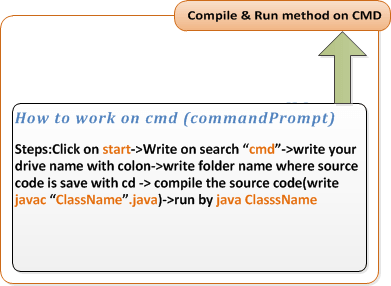
Procedure :
C:\Users\TechKnow>

C:\Users\TechKnow>H:

H:\>cd techKnow

H:\cd techKnow>javac demo.java

H:\cd techKnow>java demo
Output :
Hello Java!


