

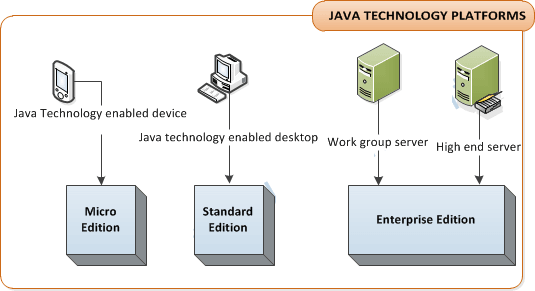
Java Technology Platforms
WORA ( Write Once Run Anywhere)
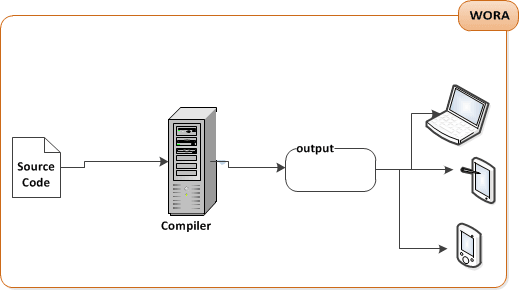
Source: create a source document. Use an established protocol.Compiler: Run your document through a source code compiler.The Compiler checks for errors and won't let you compile until it's satisfied that everything will run correctly.output: The compiler creates a new document coded into Java bytecode. Any device capable of running Java will be able to interpret/translate this file into something. It can run. The compiled bytecode is platform-independent.Virtual Machines: Your friends don't have a physical Java Machine but they all have a virtual Java Machine (implemented in software) running inside their electronic gadgets. The Virtual machine reads and runs the bytecode.
Writing First Java Program
Step -1 Write Source Code
- Example
class Test{
	public static void main(String args[]){
		System.out.println("Hello Java !");
	}
}
Step- 2 Save Code with class Name
- Test.java
Step-3 Compile the code
- javac Test.java
Note:when you compile the code it will generate an intermediate code (Byte code) it is not a machine code.Step-4 run the Program
- java Test
Note:Running the program by starting the JVM with the A.class. The JVM translates the bytecode into something the underlying platform understands , and runs your program.OUTPUT
- Hello Java !
Program Observation
We can observe our program that how it executes and what steps are done by the JVM to run Java program.
- When the JVM starts running , it looks for the
classthat is at the command line. Then it starts looking for a specially written method that looks exactly like:
public static void main(String args[])
{
	/*	Your Code Here */
}
Note: Every Java application have at least one class, and at least one main method.
You can define main method in the following ways
public static void main(String args[]){}
static public void main(String args[]){}
/*  Allowed in JDK 1.5 or higher */
public static void main(String ...a){}
/* Allowed in jdk1.5 or higher */
static public void main(String ...a){}
- The main method is
public, because java ispackage centric language. - Now JVM has to access your main method from
outside
					package
. That's why it set to as public. - The main method also
static, because static isloadedon thecompile Timeand not required to instantiate. - The main method is
void, because it is not required to return any thing to the JVM. - Main is the name of the method
and String args[]is used forcommand line arguments, where String is a Java class.
Clarification of an Exception - javac is not recognised as internal or external Command.
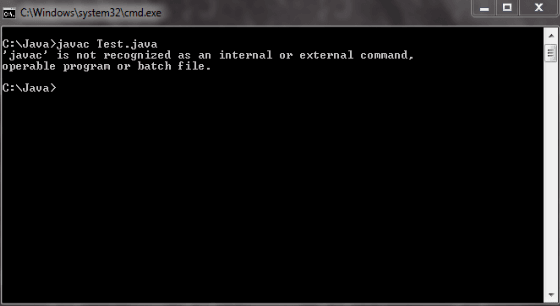
- This exception occured for fresher level while they forget to set the path of JDK.
- You can rectify this exception after Setting the path of JDK.
System.out.println() Observation
- Where System is a
final class, found injava.lang package. Out is a object ofPrintStream classand it declarestaticin the System Class. - println(String msg) this is a method define in the
PrintStream class. Used to print on console and print innew line
Java Coding Convention
Class and Interfaces: The First letter should be capital, and first letter of the inner words should be Capital.- Account
- PrintWriter
- Emp
Methods: The First Letter should be lowercase, and then normal camelCase rules should be used.- getBalance
- setCustomerName
Variables: Same rule as Method Rule ,Variables follows camelCase rules.- String empName;
- String DeptName;
Constants: Same rule as Method Rule Constants All in Uppercase.- MIN_HEIGHT
Example :
Example :
Example :
Example :


